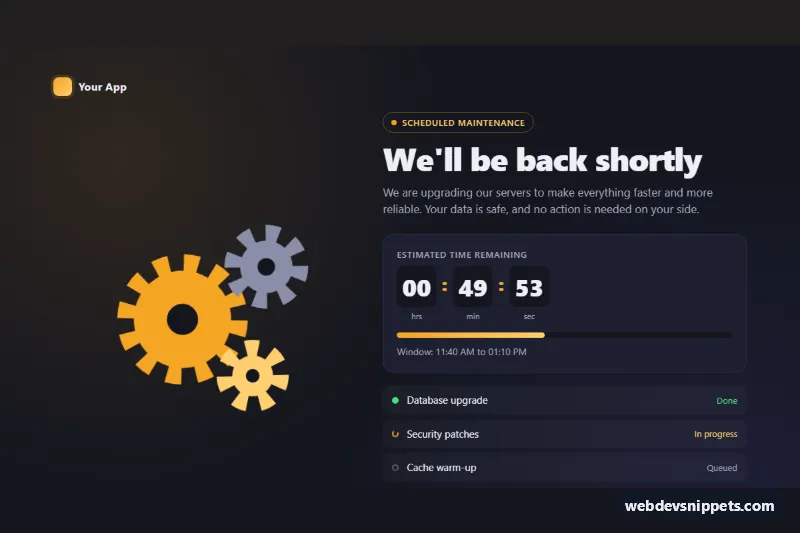
A full-page scheduled maintenance notice in pure CSS and vanilla JavaScript, with three interlocking animated gears, a live countdown, a progress bar and a task checklist. Use it as the temporary page your server returns during deployments, database migrations or planned downtime.
How it works
The root main.mt-page fills the viewport and holds .mt-shell, which contains the brand header, the .mt-grid and a footer.
The gears are a single inline SVG. Each .mt-gear group draws its teeth with one trick: .mt-teeth is a circle with a thick stroke and a stroke-dasharray equal to half the length of one tooth, so the dashes become teeth. All groups rotate with the mt-spin keyframes around their own center (transform-box: fill-box). The medium and small gears turn in reverse, and their durations are derived from --mt-gear-speed using their tooth counts (8 and 7 against 12), so they appear to mesh.
The status card shows hours, minutes and seconds in .mt-num elements marked with data-mt-part. On DOMContentLoaded the script initializes every .mt-page, reads data-mt-start and data-mt-end, updates the countdown once per second, sets the width of .mt-bar to the elapsed share of the window and writes the local start and end times into .mt-window-text. When the time is up the interval stops and .mt-done shows a completion message. If both attributes are empty, a demo window (40 minutes elapsed, 50 remaining) is used.
Customization
data-mt-startanddata-mt-endon.mt-page: set the real window as ISO 8601 dates, e.g.2026-11-02T02:00:00Z; the countdown, bar and window text follow.--mt-accentand--mt-accent-2: the amber color of the large gear, badge, timer separators, progress gradient and button.--mt-gear-speed: one full turn of the large gear;20smakes the animation calmer..mt-task--doneand.mt-task--activeon each.mt-task: mark steps as finished (green dot) or running (spinning ring); without a modifier a task shows as queued.- Change the
hrefof the "View status page".mt-linkand the support email in.mt-footer. The footer credit links to WebDevSnippets; you can keep it or remove it.
Use cases
- Deployments: a full-page notice tells visitors the site is briefly offline while you release an update
- Database migrations: a live countdown and progress bar show when service returns
- Planned downtime: a task checklist marks which steps are finished, running or queued
Accessibility
The page uses a main landmark with a single h1, and the content section is labelled by it. The SVG illustration is aria-hidden. The countdown has role="timer", the bar is a role="progressbar" whose aria-valuenow is kept up to date, and .mt-done is an aria-live="polite" status region that announces the end of maintenance. With prefers-reduced-motion: reduce the gears, the pulsing dot and the spinner stop and transitions are removed. Text colors on the dark background meet WCAG AA contrast.
Usage notes
Serve this page with HTTP status 503 and a Retry-After header during downtime so search engines keep your rankings. As a full-page template it styles body.