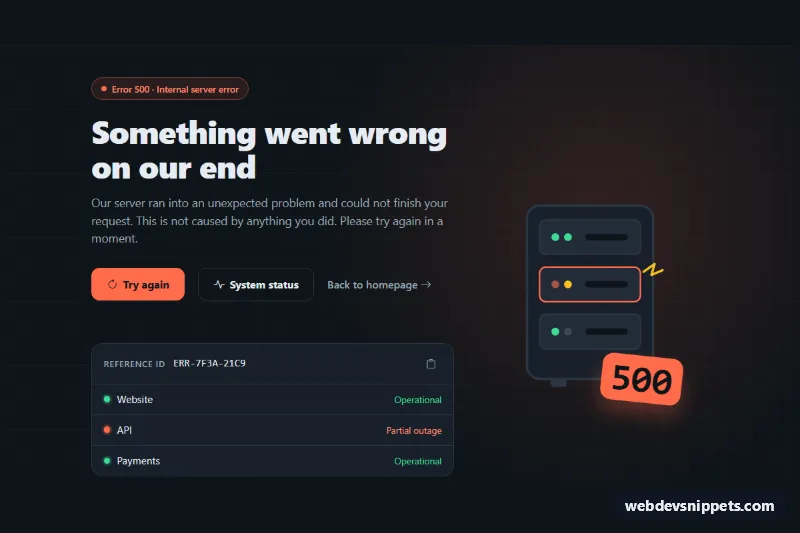
A dark Bootstrap 5 "500 Internal Server Error" page with an illustrated server rack, a retry button with a loading state, a link to your status page, a copyable reference ID and a small service status list. Use it as the error template of a web app, SaaS dashboard or API documentation site.
How it works
The root is main.bse-page, a full-height flex container with a subtle grid background. A Bootstrap row holds two columns: the text column and the .bse-art illustration, which order-md-2 moves to the right on medium screens and up. The illustration is an inline SVG (.bse-rack) with three server units; the failing unit has a blinking .bse-led--fail and a spark, and the rotated .bse-code label shows "500".
The text column starts with a .bse-badge, the heading and a lead paragraph. In .bse-actions, the .bse-retry button is the main action, followed by a ghost "System status" button and a .bse-home link. Below them, .bse-panel contains the .bse-ref row with the reference ID and the .bse-copy button, plus the .bse-services list.
The script runs on DOMContentLoaded for every .bse-page. When data-bse-demo="true" is set, a click on .bse-retry shows a spinner for 1.2 seconds and then writes a message with the attempt count into .bse-feedback. Without the attribute, the button simply calls window.location.reload(). The copy button uses the Clipboard API and falls back to document.execCommand('copy') in older or sandboxed contexts.
Customization
--bse-accentand--bse-accent-hoverin.bse-page: recolor the buttons, the 500 label, the failing server and the badge.--bse-bg,--bse-surfaceand--bse-borderin.bse-page: switch to a different dark palette or a lighter theme.--bse-okand--bse-warnin.bse-page: change the healthy and warning indicator colors.- Remove
data-bse-demo="true"from.bse-page: the retry button reloads the page instead of simulating a check. - The
window.setTimeoutin the retry handler ofscript.js: replace it with afetch()to a health-check endpoint and reload on success. - The text of
.bse-ref__value: print the real request or trace ID from your server. - The
.bse-servicesitems: use.bse-dot--downand.bse-state--downto mark a service with an outage, or remove the list.
Accessibility
The page is a main landmark labelled by its heading. The illustration is aria-hidden, and the error code is repeated in text inside the badge. .bse-feedback has role="status", so retry results and copy confirmations are announced without moving focus. The icon-only copy button has an aria-label, and during retrying the button uses aria-disabled so keyboard focus stays on it. All interactive elements show a yellow focus outline, and the blinking LED stops with prefers-reduced-motion: reduce.
Usage notes
Requires Bootstrap 5 and Bootstrap Icons. Serve this page with the HTTP status 500 so search engines and monitoring tools see the real error.