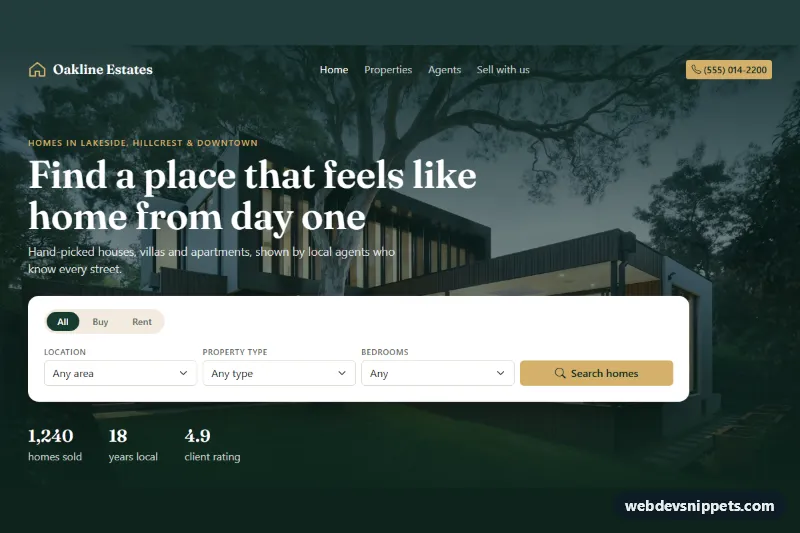
A complete Bootstrap 5 landing page for a real estate agency: a dark green navbar over a full-width house photo, a property search card, featured listings with real photos, agent cards with phone and email links, and a "Thinking of selling?" valuation form.
How it works
Everything sits inside .rea-page. The .rea-header paints the hero photo from the --rea-hero-image custom property under a green gradient overlay. It holds a Bootstrap navbar that collapses into a toggler below lg, the headline, the .rea-search form and a .rea-stats row. The search form starts with .rea-deal, a pill switch made of btn-check radios (All, Buy, Rent), followed by Location, Property type and Bedrooms selects.
Listings live in .rea-grid. Each .rea-col carries data-deal, data-city, data-type and data-beds, and wraps an article.rea-card with a 10:7 photo, a .rea-tag (green for sale, gold .rea-tag--rent for rent), a .rea-fav save button and a .rea-facts list. The script runs on DOMContentLoaded for every .rea-page. applyFilters() reads the search form with FormData, hides non-matching columns, updates the .rea-count text and shows .rea-empty when nothing matches. Changing the Buy/Rent pill filters immediately; submitting the form also scrolls to #rea-listings. The save button toggles aria-pressed and a filled heart. The .rea-cta__form validates the email and shows a thank-you message after a short simulated delay.
The house and agent photos come from Unsplash; replace them with your own listings and team portraits.
Customization
--rea-hero-imagein.rea-page: point it to your own hero photo.--rea-greenand--rea-goldin.rea-page: change the brand colors of buttons, tags, prices and the CTA panel.--rea-serifin.rea-page: swap the Fraunces heading font for another family, or remove the Google Fonts link to fall back to Georgia.data-deal,data-city,data-typeanddata-bedson each.rea-col: describe a new listing so the search can find it; add matchingoptionvalues to the selects.aspect-ratio: 10 / 7in.rea-card__media img: crop listing photos taller or wider.checkedon the#rea-anyradio: move it to#rea-buyto show only homes for sale on load.- The
setTimeoutin the.rea-cta__formsubmit handler: replace it with afetch()call to your CRM.
Use cases
- Real estate agencies: visitors filter listing cards by buy or rent, city, property type and bedrooms
- Home sellers: a valuation form invites owners to request an estimate with an email address
- Agent profiles: agent cards with phone and email links make it easy to contact the team
- Property shortlists: shoppers save favorite homes with a heart button while browsing featured listings
Accessibility
The page uses header, nav, main and footer landmarks, and each section is labelled by its heading. The search fields have visible labels and the deal switch is a fieldset with a hidden legend, so it works with arrow keys like any radio group. The results count is a live region, save buttons expose aria-pressed and a property-specific aria-label, and the CTA error sets aria-invalid and moves focus back to the field. Links and buttons get a gold focus outline, the card lift and smooth scrolling are turned off under prefers-reduced-motion, and every photo has descriptive alt text.
Usage notes
This is a full-page template, so style.css sets the body background. Requires Bootstrap 5 with its bundle (navbar collapse) and Bootstrap Icons.