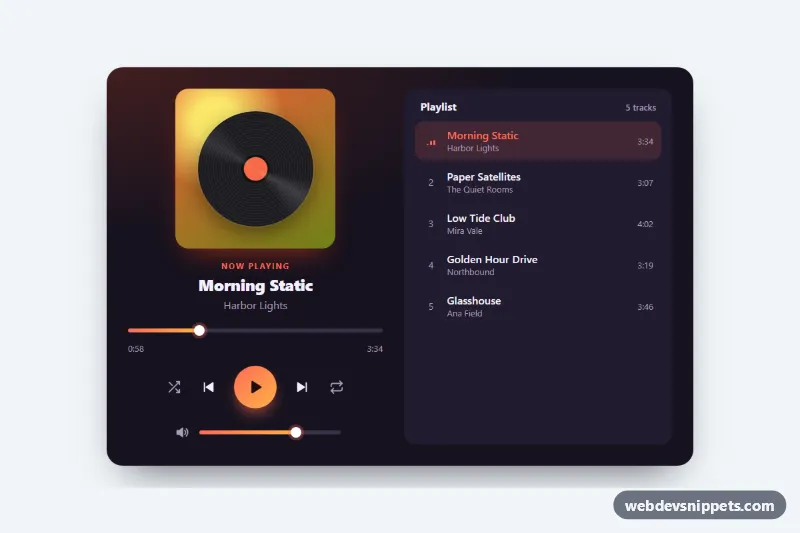
A dark music player card built with pure CSS and a small vanilla JavaScript controller. It shows a spinning vinyl cover, track details, a seek bar, transport controls, a volume slider and a clickable playlist, which makes it a good fit for podcast pages, artist sites, streaming dashboards and audio previews.
How it works
The root article.mp-player has two parts: .mp-main with the cover (.mp-art and .mp-disc), the .mp-title and .mp-artist text, the .mp-seek range input, the .mp-controls buttons and the .mp-volume row, and section.mp-playlist with an ordered list of .mp-track buttons. Each track button stores its metadata in data-title, data-artist, data-duration (seconds) and data-hue.
The script initializes every .mp-player on DOMContentLoaded. Clicking .mp-play toggles the is-playing class on the root, which swaps the play and pause icons, starts the disc rotation and animates the .mp-eq equalizer bars next to the active track. A one-second timer advances the position and updates .mp-current. .mp-prev restarts the song after three seconds or goes back one track, .mp-next moves forward, and .mp-shuffle and .mp-repeat are toggle buttons that change how the next track is chosen. Range fills are drawn with the --mp-fill-pct custom property, which the script updates on every input event.
The player is a UI shell: no audio is loaded. To play real files, add an audio element and call its play(), pause() and currentTime from the play(), pause() and loadTrack() functions in script.js.
Customization
--mp-accentand--mp-accent-2on.mp-player: the gradient of the play button, range fills and active track.data-hueon each.mp-track: a hue from 0 to 360 that recolors the cover, the glow behind the card and the disc label when that track loads.data-durationon each.mp-track: the track length in seconds; also update the visible.mp-track-time.--mp-spin: rotation time of the vinyl disc, e.g.4sfor a faster spin.--mp-bgand--mp-surface: the card background and the playlist panel color.--mp-radius: corner radius of the card; the playlist panel follows it.grid-template-columnsin themin-width: 720pxmedia query: the side-by-side layout of player and playlist.
Accessibility
All controls are native button and input type="range" elements with an aria-label. The play button switches its label between "Play" and "Pause", shuffle, repeat and mute use aria-pressed, and the active track has aria-current="true". The seek bar exposes aria-valuetext such as "0:58 of 3:34". Track changes are announced through the visually hidden .mp-status live region. Every control has a :focus-visible outline, and prefers-reduced-motion: reduce stops the disc and equalizer animations.
Usage notes
Several players can share a page; each root keeps its own state and timer.