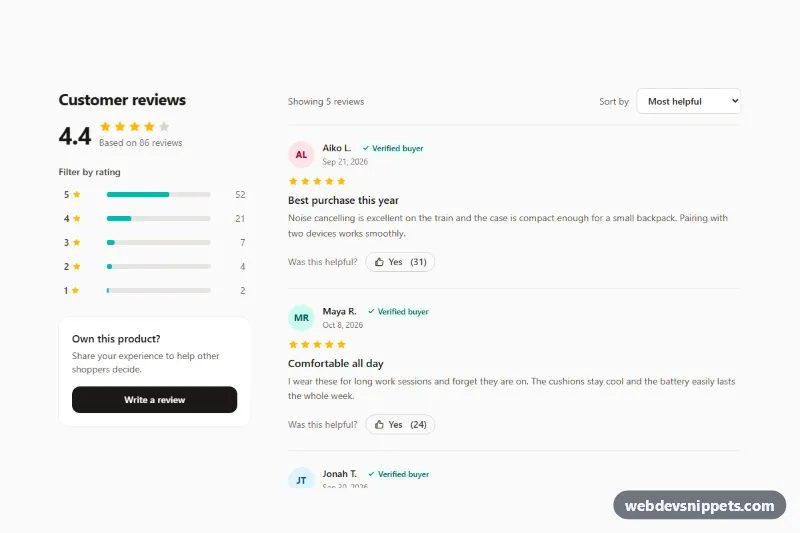
A product reviews section built with Tailwind CSS and vanilla JavaScript for e-commerce product pages. A rating overview with the average score and a five-row breakdown sits next to a list of customer reviews; each breakdown bar filters the list, a select sorts it, and every review has a "Was this helpful?" vote button with a live count.
How it works
The root is .tpr-reviews. On large screens the section becomes a two-column grid (lg:grid-cols-[18rem_1fr]) and the overview column stays in view with lg:sticky. On phones the overview stacks above the reviews.
Each breakdown row is a button with data-tpr-filter (1 to 5) and aria-pressed. Bar widths are plain utilities such as w-[60%], so they render without JavaScript. Each review is an li marked data-tpr-review with three data attributes the script reads: data-tpr-rating, data-tpr-date (ISO date) and data-tpr-helpful (vote count).
On DOMContentLoaded the script initializes every .tpr-reviews. Clicking a rating button hides reviews with a different rating and presses that button; clicking it again, or the data-tpr-clear button, shows everything. The data-tpr-status line reports how many reviews are visible and the data-tpr-empty message appears when no review matches. Changing the data-tpr-sort select reorders the list nodes using the SORTERS object: most helpful, newest, highest or lowest rating. The data-tpr-vote buttons toggle aria-pressed, add or remove one vote and update both data-tpr-vote-count and data-tpr-helpful, so sorting by "Most helpful" uses the new totals.
Customization
data-tpr-rating,data-tpr-dateanddata-tpr-helpfulon each review: render these from your database; filtering and sorting work from them.w-[60%]on each breakdown bar: set the percentage of reviews for that star level.bg-teal-500on the bars andaria-pressed:bg-teal-700on the vote buttons: swaptealfor your brand color.text-amber-400/text-stone-300on the star SVGs: change filled and empty star colors.SORTERSinscript.js: add an option such as "oldest" and a matchingoptionin the select.lg:grid-cols-[18rem_1fr]on thesection: widen or narrow the overview column.- Remove
lg:sticky lg:top-6to let the overview scroll with the page.
Accessibility
Star rows use role="img" with an aria-label such as "Rated 4 out of 5 stars", and every decorative icon is aria-hidden. Each review is an article labelled by its h4, and dates use time elements. Breakdown and vote buttons expose their state through aria-pressed; visually hidden text adds "stars", "reviews" and the reviewer's name so each control has a clear, unique name. The sort select has a real label, and filter results are announced through a polite role="status" region. All controls are native elements with visible focus outlines, and color transitions are disabled under prefers-reduced-motion.
Usage notes
Votes are stored only in the page. Add a fetch() call where the comment in the vote handler indicates to persist them, and limit one vote per user on the server.