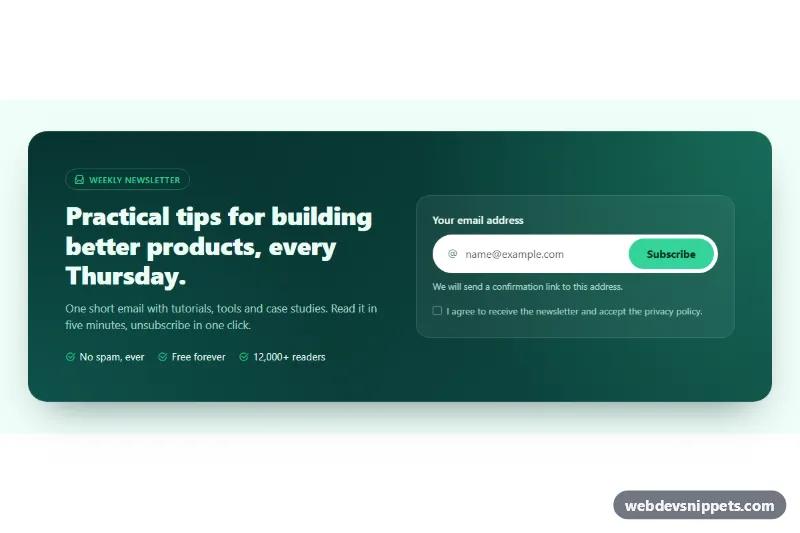
A Bootstrap 5 call-to-action band that puts the newsletter pitch on the left and an email capture form on the right, inside a dark green gradient panel. Use it at the end of blog posts, on landing pages or above the footer to grow a mailing list.
How it works
The root is section.sn-cta. Inside a Bootstrap container, the rounded .sn-panel holds a row with two col-lg-6 columns. The left column has the .sn-eyebrow pill, the .sn-title heading, the .sn-lead paragraph and the .sn-perks list. The right column holds .sn-card, a translucent glass card with the .sn-form. Below the lg breakpoint the columns stack, and below 576px the email field and the .sn-submit button stack too; from 576px up, .sn-field turns into a single white pill with the button inside it.
The form uses novalidate, so the script does the checking. On submit it tests the email against EMAIL_PATTERN and requires the consent checkbox. Invalid fields get is-invalid, aria-invalid="true" and their error id in aria-describedby, and the first invalid field receives focus. After the first attempt, input and change listeners re-validate live. A valid form shows the spinner, sets aria-disabled on the button and, after a short demo delay, resets the form and writes a confirmation into .sn-status.
Customization
--sn-bg-fromand--sn-bg-toin.sn-cta: change the two colors of the panel gradient.--sn-accent,--sn-accent-hoverand--sn-accent-inkin.sn-cta: recolor the button, checkmarks, focus ring and success message.--sn-radiusin.sn-cta: make the panel and card corners rounder or square.background: #f0fdf9in.sn-cta: set the page area around the panel, or usetransparent.EMAIL_PATTERNat the top ofscript.js: tighten or relax the email check.- The
window.setTimeoutcall inscript.js: replace it withfetch()to your newsletter provider and show the message in its callback. - Swap the
.sn-perksitems for your own selling points; the list wraps on small screens.
Accessibility
The section is labelled by #sn-title. The email input has a visible label and is always described by the #sn-hint text; error messages are added to aria-describedby only while a field is invalid. The consent checkbox is required and has its own error. During sending the button uses aria-disabled instead of disabled, so focus is not lost. .sn-status is a polite live region, so the confirmation is announced. The button has a white focus-visible outline, icons are aria-hidden, and the success animation is removed with prefers-reduced-motion: reduce.
Usage notes
Requires Bootstrap 5 and Bootstrap Icons. Each .sn-cta instance is wired independently, but give the ids (sn-email, sn-consent and their errors) unique values if you place two on one page.