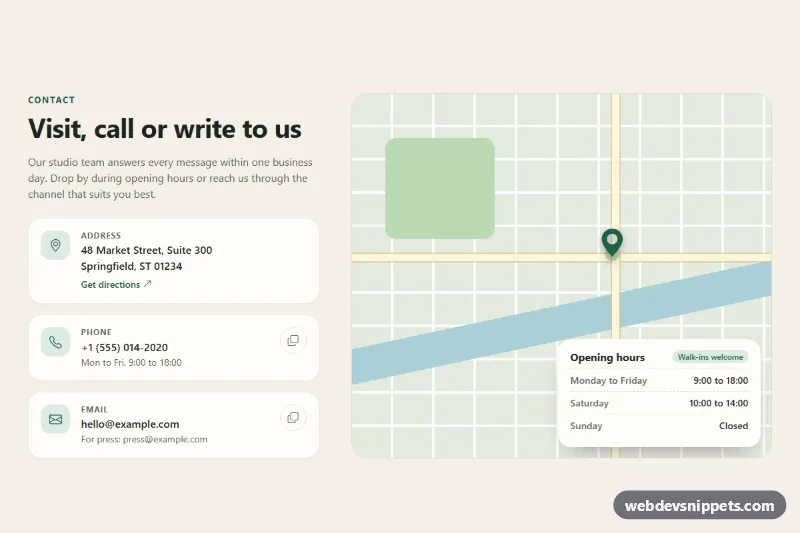
A Bootstrap 5 contact section with address, phone and email detail cards, one-click copy buttons and a CSS-only map placeholder with an opening hours panel. Use it on contact pages, store locators or the last section of a company landing page.
How it works
The root is section.ctd-section, which defines all colors as custom properties and paints a warm sand background. A Bootstrap row splits the content into a col-lg-5 text column and a col-lg-7 map column; below the lg breakpoint the map moves under the cards.
Each contact channel is an li.ctd-card: a rounded .ctd-icon tile with a Bootstrap Icon, a small uppercase .ctd-label, the main .ctd-value and a .ctd-note. The address uses a real address element. Phone and email values are tel: and mailto: links, so they work on mobile without JavaScript.
The map is drawn entirely in CSS. .ctd-map__canvas uses two repeating-linear-gradient layers for the street grid, and absolutely positioned spans add the river (.ctd-map__river), a park (.ctd-map__park) and two main roads. The .ctd-pin icon sits at the crossing and has a pulsing ring drawn with ::after. The .ctd-hours card floats over the bottom of the map and lists opening times in a dl.
The script runs on DOMContentLoaded for every .ctd-section. Buttons with data-ctd-copy copy their value with navigator.clipboard.writeText() and fall back to document.execCommand('copy'). On success the icon switches to a check mark for two seconds and .ctd-status confirms the copied value; if copying is blocked, the status shows the value so it can be selected by hand.
Customization
--ctd-accentand--ctd-accent-softin.ctd-section: recolor the icon tiles, links, pin, badge and copy button hover state.--ctd-bgand--ctd-surfacein.ctd-section: change the section background and the card background.--ctd-map-land,--ctd-map-waterand--ctd-map-parkin.ctd-section: restyle the placeholder map.top: 44%andleft: 62%in.ctd-pin: move the pin; keep them in sync with.ctd-map__road--hand.ctd-map__road--v.data-ctd-copyon a.ctd-copybutton: set the exact text that is copied, or remove the button to hide copying for that card.- Replace
.ctd-map__canvaswith an embedded mapiframethat fills.ctd-map; the.ctd-hourscard stays on top. min-height: 22remin.ctd-map: make the map taller on small screens.
Accessibility
The section is labelled by its heading through aria-labelledby. Icons are aria-hidden, and each copy button has its own aria-label such as "Copy phone number". .ctd-status is a role="status" live region, so copy results are announced. The map placeholder is a single role="img" element with a descriptive label, while the opening hours stay outside it as readable text. Links and buttons get a solid :focus-visible outline, and the pulsing pin is static when prefers-reduced-motion is set.
Usage notes
Requires Bootstrap 5 (added automatically) and Bootstrap Icons. Clipboard access can be blocked in sandboxed iframes; the fallback message covers that case.