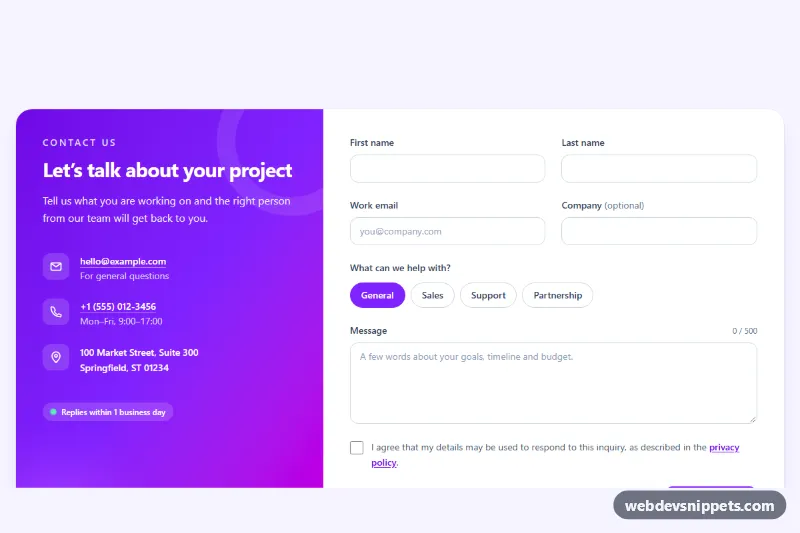
A split contact section built with Tailwind CSS: a violet-to-fuchsia info panel with email, phone and office address sits next to a clean contact form with topic chips, a character counter, inline validation and a simulated send state. It suits contact pages, agency sites and the closing section of a product landing page.
How it works
The root is section.tcs-contact. Inside, one rounded card uses a five-column grid from the lg breakpoint: the info panel spans two columns and the form spans three. On phones the panel stacks above the form.
The panel uses bg-linear-to-br from-violet-700 via-violet-600 to-fuchsia-600 with two decorative circles. Contact details are a dl: each dt is an icon tile with a visually hidden label (Email, Phone, Office) and each dd holds a mailto: or tel: link or an address element. A small pill with a pinging dot shows the expected reply time.
The form is form.tcs-form with novalidate. Required fields sit in wrappers marked data-tcs-field, each with a hidden error message marked data-tcs-error. The topic chips are visually hidden radio inputs using the peer class; their sibling span turns violet with peer-checked: and shows a ring with peer-focus-visible:.
The script runs on DOMContentLoaded for every .tcs-form. On submit it checks each field (non-empty, checkValidity() for the email, checked for the consent box), sets aria-invalid, shows the error and adds its id to aria-describedby, then focuses the first invalid field. After the first attempt, fields re-validate on input, change and blur. The data-tcs-count element tracks the maxlength of the message. A valid submit disables .tcs-submit, reveals .tcs-spinner, waits for data-tcs-delay milliseconds, resets the form and writes a success message into data-tcs-status.
Customization
- The
window.setTimeoutin the submit handler ofscript.js: replace it withfetch()to your endpoint; a commented example showsnew FormData(form). data-tcs-delayon.tcs-form: change the simulated send time (default1200ms).maxlength="500"on#tcs-message: the counter reads the new limit automatically.from-violet-700 via-violet-600 to-fuchsia-600on the panel andbg-violet-600on.tcs-submit: switch to another palette such asfrom-sky-700 to-cyan-500.lg:grid-cols-5withlg:col-span-2andlg:col-span-3: give the form more or less room.- Add or rename topic chips by copying a
labelwith apeer sr-onlyradio and changing itsvalue.
Accessibility
Every input has a visible label, the chips are grouped in a fieldset with a legend, and radios stay keyboard operable with arrow keys. Errors are linked through aria-describedby only while they are visible, together with aria-invalid. The status line has role="status" and aria-live="polite", and the form sets aria-busy while sending. Contact icons are aria-hidden with sr-only labels. All controls show visible focus rings, and the spinner, ping and transitions stop under prefers-reduced-motion.
Usage notes
For several forms on one page, give each copy unique id values for inputs, errors and the counter.