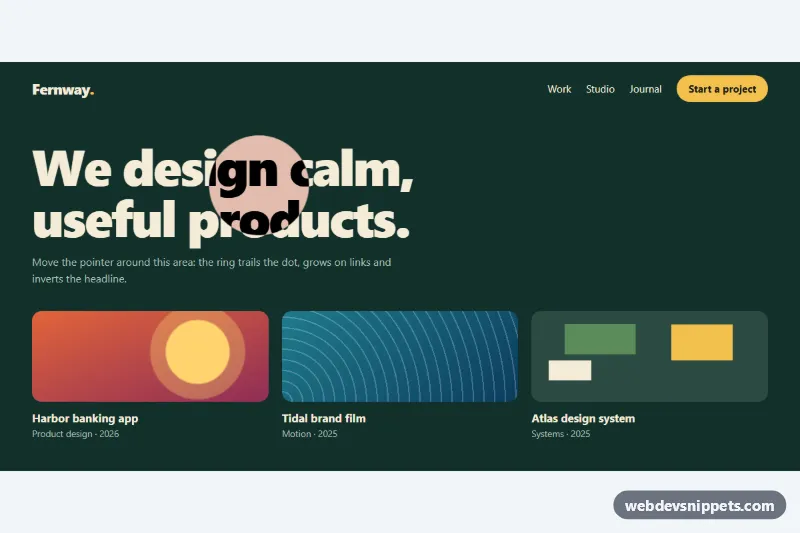
A custom cursor follower built with CSS and a small vanilla JavaScript loop. A small dot tracks the pointer exactly, and a ring eases after it. The ring changes shape depending on what is under it: it grows over links, becomes a labelled "View" or "Play" disc over project cards, and turns into a large inverting lens over the headline. It suits portfolio sites, agency landing pages and creative showcases.
How it works
The root section.cf-area contains the page content (a .cf-bar with logo and navigation, the .cf-title headline and a .cf-grid of .cf-card links) plus two follower elements at the end: .cf-ring (with an inner .cf-ring-shape and .cf-label) and .cf-dot. Both are absolutely positioned inside the root, and the root uses overflow: hidden, so the effect stays inside the component.
On DOMContentLoaded the script checks (hover: hover) and (pointer: fine). Only on such devices does it add .cf-area--active, which hides the native cursor with cursor: none and shows the follower. The script listens for pointermove on the area and moves .cf-dot straight to the pointer with translate3d. A requestAnimationFrame loop moves the ring a fraction of the remaining distance (the EASE constant, 0.18) on each frame, and stops once the ring has settled. The nearest [data-cf] ancestor under the pointer sets data-state on the ring. CSS then animates the ring size, fill and label for link, view and text. The text state uses mix-blend-mode: difference, which inverts the headline under the lens. On pointerleave the follower fades out.
On load, the follower is placed on the element with data-cf-start, so it is visible before the pointer moves. On touch screens nothing changes and the normal cursor stays.
Customization
data-cf="link","view"or"text"on any element inside.cf-area: chooses the ring state over that element.data-cf-labelon adata-cf="view"element: the word inside the filled disc, such asView,PlayorOpen.--cf-ring-size,--cf-ring-link,--cf-ring-viewand--cf-ring-texton.cf-area: the ring diameter in each state.--cf-accent: the dot color and the fill of the link and view states.--cf-textis the ring border and the lens color.EASEat the top ofscript.js: lower values such as0.1give a longer, floatier trail;1removes the lag.--cf-dot-size: the size of the inner dot.- Move
data-cf-startto another element, or remove it, to change where the follower appears on load.
Accessibility
The follower elements are aria-hidden and use pointer-events: none, so they never block clicks or reach screen readers. All targets are real links and buttons that keep their native :focus-visible outline in the accent color. The native cursor is hidden only for fine mouse pointers, never on touch devices. With prefers-reduced-motion: reduce the ring follows without lag, and the size transitions are turned off.
Usage notes
Each .cf-area runs its own follower, so several can share a page. To use the effect on a whole page, put .cf-area around the page content and remove overflow: hidden.