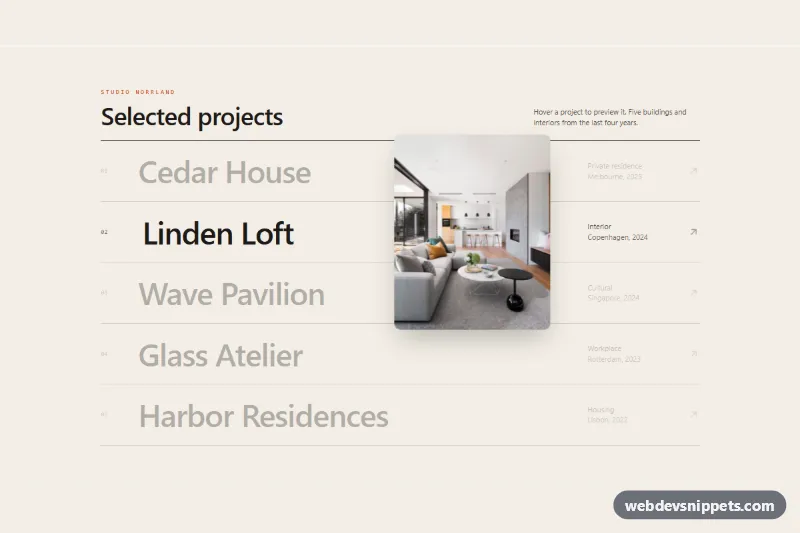
An editorial project list built with Tailwind CSS where hovering a row reveals a photo that follows the mouse cursor. The preview glides behind the pointer with smooth easing, tilts with the movement and cross-fades between projects. It fits portfolio sites, design studios and agency case-study indexes.
How it works
The root is section.irc-reveal. The list (ul.irc-list) contains one link per project: a.irc-item with a data-irc-index, the large .irc-name title, a type column and an arrow. A single floating preview, div.irc-preview with data-irc-preview, sits at the end of the section. Its .irc-frame holds one img.irc-img per project, linked by data-irc-img.
The script listens to pointermove on the root and converts the cursor position into coordinates relative to the section. A requestAnimationFrame loop moves the preview a fraction of the remaining distance each frame (linear interpolation), sets translate3d() and a rotation based on the horizontal speed, and stops as soon as the preview settles. pointerenter on a row adds .is-current to that row and its photo and .is-active to the root; pointerleave on the list hides the frame again. In style.css, .is-active scales and fades in .irc-frame, .irc-img.is-current cross-fades the photo with a slight zoom-out, and the other rows dim to --irc-dim.
On first load (pointer devices only) the row whose index matches data-irc-default is already previewed beside its title, so the photo is visible before any interaction. When the pointer enters another row, the preview glides from that spot to the cursor and normal following takes over.
On devices without hover (@media (hover: none)) the floating preview is hidden and a small inline .irc-thumb image appears in every row instead, so touch users still see each project.
Customization
data-irc-easeon.irc-reveal: add a value between0.05(lazy, floaty) and1(sticks to the cursor); the default is0.16.data-irc-tilton.irc-reveal: maximum rotation in degrees while moving; the default is10.h-[375px] w-[300px]on.irc-preview: change the preview size or ratio, e.g.h-[240px] w-[360px]for landscape photos.--irc-diminstyle.css: opacity of the rows that are not previewed; use1to disable dimming.data-irc-defaulton.irc-reveal: index of the project shown on load; remove the attribute to start with the preview hidden.- Add a row by copying an
liand adding a matchingimg.irc-img; keepdata-irc-indexanddata-irc-imgin sync.
Accessibility
Each project is a real link with a visible name, so the list works with a keyboard and screen readers on its own. The floating preview is aria-hidden="true" and pointer-events-none, because it only repeats what the link says. When a row receives keyboard focus the preview appears next to it, and every link shows an orange focus-visible outline. Under prefers-reduced-motion: reduce the preview jumps straight to the cursor without easing, tilt or zoom.
Usage notes
The photos come from Unsplash; replace them with your own project images. The demo links use href="#", which the script ignores; point them to real pages.