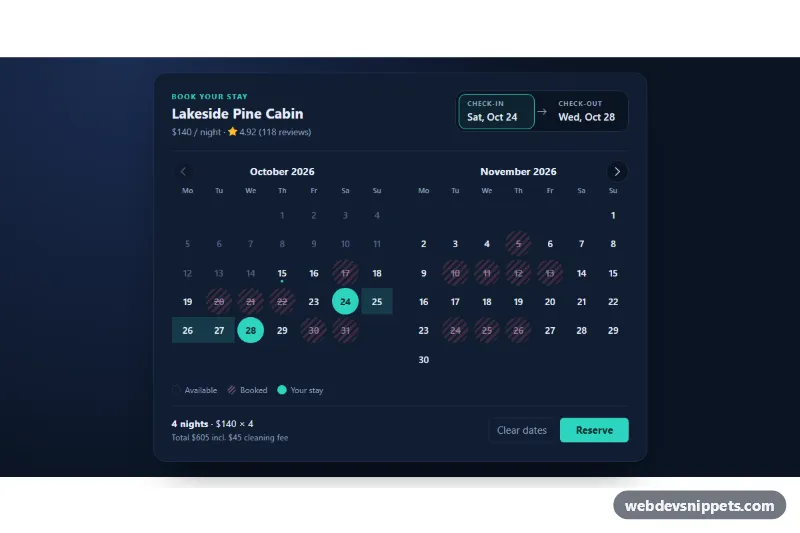
A Bootstrap 5 booking date picker with check-in and check-out fields, a two-month calendar and blocked dates that cannot be booked. It suits vacation rentals, hotels, campsites and any reservation form that needs a valid date range.
How it works
The root section.bdp holds a form.bdp-card with a header, two .bdp-field buttons (check-in and check-out), the calendar area .bdp-months, a legend and a footer with the nights, the total price, "Clear dates" and "Reserve". The script renders two months as Bootstrap columns; under 768px the second month is hidden with d-none d-md-block, so phones see one month.
Each day is a button.bdp-day inside a table.bdp-grid. Past dates and the dates listed in data-bdp-booked get aria-disabled="true" and the striped .is-booked style. The first click sets check-in, the second sets check-out. While choosing check-out, the script finds the first booked night after check-in and marks later days with .is-out-of-reach, so a stay can never cross a booked date. The booked day itself stays selectable as the departure day, because guests leave before the next guest arrives. Stays shorter than data-bdp-min-nights are blocked. Hovering shows the future range with .is-preview; the chosen range uses .is-start, .is-in-range and .is-end. The selected dates are written to the hidden inputs checkin and checkout in ISO format, and the submit handler only simulates a request.
Customization
data-bdp-bookedon.bdp: comma-separated booked dates; use offsets from today (+5), ISO dates (2026-12-24) or ranges (+5..+7).data-bdp-startanddata-bdp-endon.bdp: the preselected stay; remove both to start empty.data-bdp-min-nightson.bdp: the minimum stay, e.g.3for long weekends.data-bdp-rateanddata-bdp-feeon.bdp: the nightly price and cleaning fee used in the footer total.--bdp-accentin.bdp: the teal used for selected days, the Reserve button and the active field.--bdp-dayin.bdp: the size of the round day buttons.- The
submithandler inscript.js: replace the timeout with afetch()that sendscheckinandcheckoutto your booking API.
Accessibility
Each month is a role="grid" table labelled by its month heading, with full weekday names in the abbr attribute. Day buttons carry labels such as "Saturday, October 24, 2026, check-in" or "unavailable". Only one day is in the tab order (roving tabindex); Arrow keys move by day and week, Home and End jump within the week, and Page Up and Page Down change month. The two field buttons use aria-pressed to show which date is being edited. Selections and errors are announced through the role="status" element .bdp-status. Focus rings are yellow for strong contrast on the dark navy card.
Usage notes
Requires Bootstrap 5 and Bootstrap Icons. Load real availability from your server and write it into data-bdp-booked before the script runs; each .bdp instance works on its own.