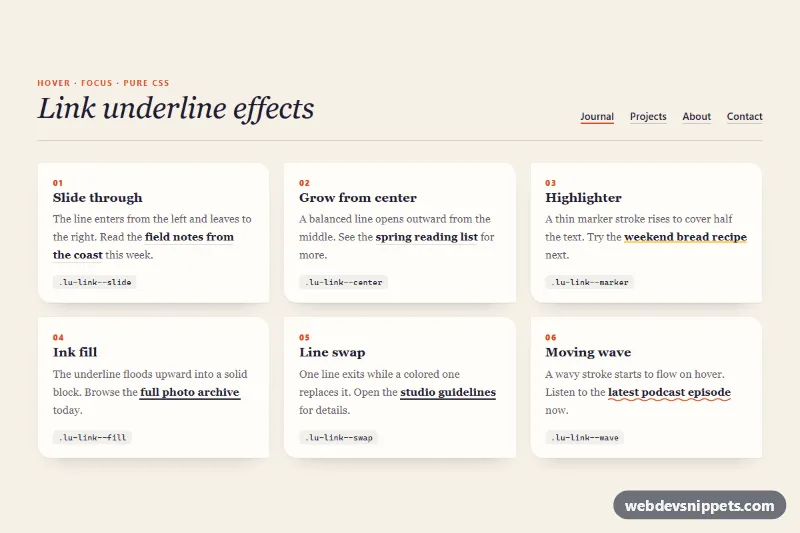
Six animated link underline styles in pure CSS, shown as an editorial showcase with a sample navigation bar. Each style is a single modifier class on a normal <a> element, so you can drop it into navigation menus, blog posts, footers or any body text.
How it works
The root section.lu-showcase contains a .lu-head with the title and a nav.lu-nav, followed by the .lu-grid of article.lu-card demos. Every link has the base class .lu-link plus one effect modifier.
None of the effects use ::after or text-decoration. Each line is a linear-gradient drawn as a background-image with background-repeat: no-repeat. A hover animates background-size, and sometimes background-position, with a transition on .lu-link. Because the lines are backgrounds and box-decoration-break: clone is set, they follow the text across line breaks. Look at "field notes from the coast" in the first card: an ::after underline would only appear under the last line.
.lu-link--slidegrows the accent line from the left. On mouse-out the position flips to the right, so the line leaves in the same direction. The nav uses it, andaria-current="page"keeps the current item underlined..lu-link--centeropens from50%..lu-link--markerraises a yellow highlighter from0.2emto0.62emtall..lu-link--fillfloods the ink line to100%height and turns the text cream..lu-link--swapshrinks the dark line to the right while a blue line grows in..lu-link--waveuses an inline SVG wave that scrolls with thelu-wavekeyframes.
Customization
--lu-accenton.lu-showcase: the color of the slide and center lines and the eyebrow text. The wave color is thestrokeinside the SVG data URI,%23d9481f.--lu-accent-2: the incoming line and hover color of.lu-link--swap, and the focus outline color.--lu-marker: the highlighter color of.lu-link--marker.--lu-thickness: the line height for slide, center, fill and swap.3pxgives a bolder look.--lu-speed: the duration of every transition.--lu-faint: the resting hairline under slide and center links. Set it totransparentto hide lines until hover.grid-template-columnsin the.lu-gridmedia queries: one column on phones, two from 640px and three from 980px.
Accessibility
All links are visibly marked at rest with a hairline, a marker stroke, a solid line or a wave, not by color alone. Every effect also runs on :focus-visible, and a 2px outline is added for keyboard users. The navigation is a labelled nav with aria-current="page" on the current item. The decorative card numbers are aria-hidden. With prefers-reduced-motion: reduce the transitions are removed, so the final states appear at once, and the wave stops moving. The ink fill switches the text to cream, which keeps the contrast high.
Usage notes
To use one effect in your own site, copy the .lu-link base rule and its modifier, and change --lu-* values or replace them with your own colors. The effects need no JavaScript and work in all current browsers.