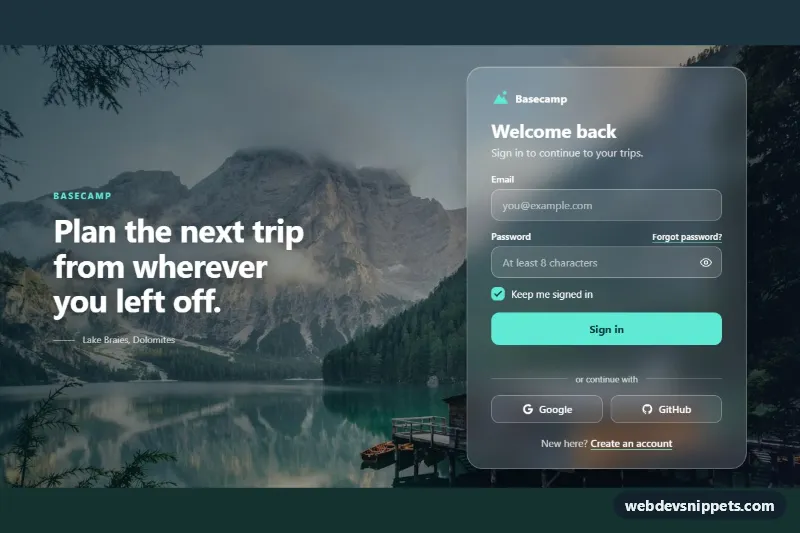
A full-page login screen built with pure CSS and a little vanilla JavaScript: a frosted glass card floats over a scenic mountain lake photo, next to a large headline on wide screens. Use it as the sign-in page of a travel app, a dashboard or any product that wants a calm, photographic first impression.
How it works
The root main.gl-page is a full-height grid. The photo is a regular img.gl-bg stretched with object-fit: cover behind everything, and .gl-page::before lays the --gl-overlay gradient on top so white text keeps its contrast. Inside .gl-shell sit the decorative .gl-aside headline (shown from 900px) and the section.gl-card. The glass effect comes from a translucent --gl-glass background, a light --gl-glass-border and backdrop-filter: blur(var(--gl-blur)) saturate(140%); an @supports not rule swaps in a more opaque tint for browsers without backdrop-filter.
The .gl-form contains an email field, a password field with a .gl-reveal button, a custom .gl-check checkbox and the .gl-submit button. The script listens for click on .gl-reveal to switch the input type and aria-pressed, for input to clear errors as soon as a field becomes valid, and for submit. On submit it calls preventDefault(), validates both fields, shows the .gl-error messages and focuses the first invalid input. Valid data adds .is-loading (which shows the .gl-spinner), disables the button and, after a short timeout, writes a confirmation into the .gl-status live region. Replace that timeout with a fetch() call to your authentication endpoint.
Customization
--gl-accentand--gl-accent-inkon.gl-page: color of the submit button, focus rings, logo and checkbox, and the text on top of them.--gl-blur: strength of the frosted glass, e.g.8pxfor a clearer view of the photo.--gl-glassand--gl-glass-border: the tint and edge of the card; raise the alpha for a milkier panel.--gl-overlay: the gradient over the photo; make it darker if your own image is bright.- Change the
srcof.gl-bgto use your own background. The photo comes from Unsplash and should be replaced with your own image. - Remove
.gl-asidefor a single centered card, or edit.gl-aside__quoteto change the headline. EMAIL_PATTERNand the>= 8check inscript.js: the validation rules for email and password length.
Use cases
- Travel apps: a calm lake photo behind a frosted card gives sign-in a welcoming first impression
- Dashboards and SaaS products: a full-page sign-in with email, password reveal and inline validation
- Lifestyle brands: pair the large headline on wide screens with a glass card on top of photography
- Member areas: remember me checkbox and social buttons sit inside a translucent card
- Prototypes: a simulated sign-in state with spinner and status message shows the full flow
Accessibility
Every input has a visible label, autocomplete values and aria-describedby pointing to its error message; invalid fields get aria-invalid="true". The password toggle is a real button with aria-controls, aria-pressed and a label that changes between "Show password" and "Hide password". The result message lives in a role="status" region. Buttons, links and the custom checkbox all have strong focus outlines. The background photo uses an empty alt because it is decorative, and with prefers-reduced-motion: reduce transitions are removed and the spinner slows down.
Usage notes
This is a full-page template, so .gl-page uses min-height: 100dvh. The social buttons are placeholders; wire them to your OAuth provider.