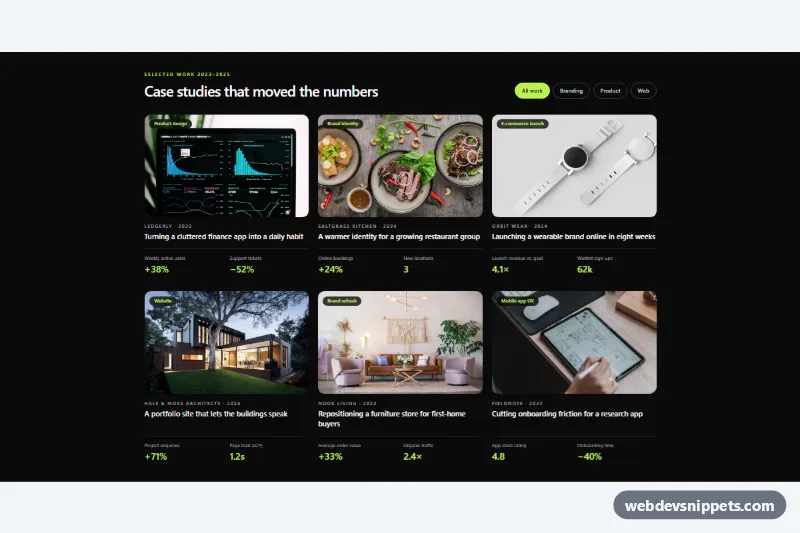
A dark, editorial case study grid for agency and studio portfolios, built with Tailwind CSS and a small vanilla JavaScript filter. Each card pairs a project photo with the client, the year, a one-line story and two headline results, so visitors see outcomes before they click through to the full case study.
How it works
The root is section.acs-work. Its header holds the eyebrow, the heading and a role="group" of filter buttons, each with a data-acs-filter value (all, branding, product, web) and an aria-pressed state. Tailwind's aria-pressed: variants paint the active button lime, so no classes are swapped by hand.
The cards live in a ul grid that is one column on phones, two from sm and three from lg. Every li.acs-card carries data-acs-category and contains a 16:10 object-cover image with a service badge, a client and year line, an h3 with the case study link and a dl with two results. The link uses after:absolute after:inset-0 to stretch over the whole card, so the entire card is clickable while the accessible name stays the short title. mt-auto on the dl keeps result rows aligned when titles wrap.
On DOMContentLoaded the script initializes every .acs-work. A click on a filter button calls applyFilter(), which updates aria-pressed, sets hidden on cards whose category does not match, replays the acs-in entrance animation on cards that return through .acs-card--in, and writes a summary such as "Showing 2 of 6 case studies in Web." into the status region. Without JavaScript all six cards stay visible.
Customization
--acs-accentinstyle.css: changes the hover underline and the focus ring around a card; also replacelime-300in the markup for the badges, results and active filter.data-acs-categoryon eachli.acs-cardanddata-acs-filteron the buttons: add your own services, for examplestrategyormotion.aspect-[16/10]on.acs-img: useaspect-squareoraspect-[4/5]for portrait-led work.sm:grid-cols-2 lg:grid-cols-3on theul: switch toxl:grid-cols-4for a denser wall of projects.bg-neutral-950on.acs-work: swap forbg-stone-100and dark text utilities for a light version.transform: scale(1.05)in the.acs-card:hover .acs-imgrule: increase or remove the hover zoom.- Add a third
divinside a card'sdland changegrid-cols-2togrid-cols-3to show more results.
Accessibility
Filters are real buttons with aria-pressed, grouped under an aria-label, and every change is announced through a visually hidden role="status" region. Results use a dl so each number is read together with its label. Hidden cards use the hidden attribute, so they leave the reading order and the Tab order. The stretched link gives one focus stop per card, and :has(.acs-link:focus-visible) draws a lime ring around the whole card. Images have descriptive alt text, light grey text on near-black keeps contrast high, and hover zoom and entrance motion are removed under prefers-reduced-motion: reduce.
Usage notes
The project photos come from Unsplash and are placeholders; replace them with your own work and update the alt text, links and figures.