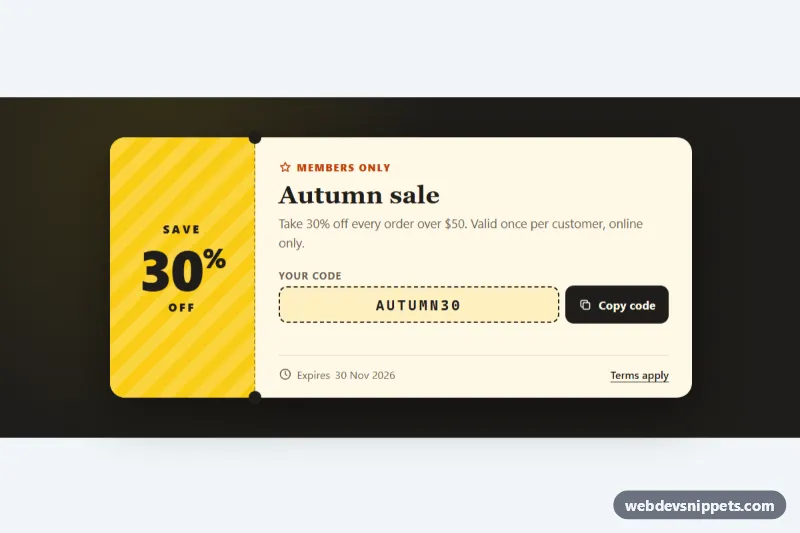
A ticket-style discount coupon built with pure CSS and a few lines of vanilla JavaScript. A striped yellow stub shows the discount, a dashed perforation with round notches separates it from the details, and a Copy code button puts the promo code on the clipboard. Use it in promo banners, checkout pages, newsletter landing pages and loyalty sections.
How it works
The root section.cpn-root centers one article.cpn-ticket. The ticket is a CSS grid with two parts: .cpn-stub (the .cpn-save label, the large .cpn-amount and .cpn-off) and .cpn-main (eyebrow, .cpn-title, .cpn-text, the .cpn-code-row and a .cpn-footer with the expiry date and a terms link). On phones the stub sits on top; from 600px it moves to the left. The perforation is a dashed border on the stub, and the notches are the stub's ::before and ::after circles filled with the page color --cpn-bg, positioned exactly on the dashed line. A drop-shadow filter lifts the whole ticket off the dark background.
The script finds every .cpn-ticket and listens for click on .cpn-copy. It reads the code from data-code (or the .cpn-code text) and tries the async Clipboard API first. If that is unavailable, for example in a sandboxed frame, it falls back to a temporary textarea and document.execCommand('copy'). On success the button gets .is-copied, swaps the copy icon for a check, shows "Copied" for RESET_MS milliseconds and writes a message to .cpn-status. If both methods fail, the code text is selected so the user can copy it with the keyboard.
Customization
--cpn-stuband--cpn-stub-inkon.cpn-root: background and text color of the discount stub.--cpn-paperand--cpn-ink: the ticket body color and the main text, code border and button color.--cpn-bg: the page background, also used for the notches; change both together so the notches look cut out.--cpn-notch: the diameter of the two notches on the perforation.--cpn-accent: color of the eyebrow, button hover and focus outlines.data-codeon.cpn-copyand the text of.cpn-code: the promo code that is shown and copied.RESET_MSinscript.js: how long the "Copied" state stays visible.
Accessibility
The copy action is a real button with a visible text label and a :focus-visible outline; the icons are aria-hidden. Results are announced through .cpn-status, which has role="status" and aria-live="polite". The expiry date uses a time element with a machine-readable datetime. The code is set in a monospace font with user-select: all, so it can be selected with a single click. Under prefers-reduced-motion: reduce the button press animation is turned off.
Usage notes
Several tickets can share a page; each .cpn-ticket is handled on its own. The Clipboard API needs a secure context (HTTPS or localhost).