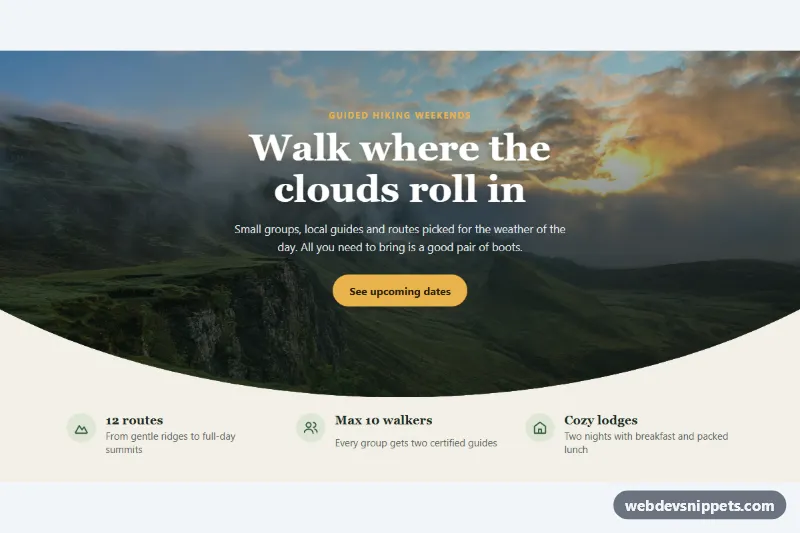
A photo hero section with a curved bottom edge made with CSS clip-path, followed by a row of three feature items. It needs no JavaScript and no SVG divider, so it is a light way to add a soft, organic transition between a full-width image and the content below, for travel, outdoor, hospitality or event pages.
How it works
The root section.cpc-section contains the .cpc-hero block and a ul.cpc-features list. Inside the hero, the img.cpc-photo is positioned absolutely and fills the box with object-fit: cover. A ::after pseudo-element lays the --cpc-overlay gradient over the photo, and the .cpc-copy block (eyebrow, title, text and .cpc-button) sits above it.
The curve comes from one line: clip-path: ellipse(var(--cpc-curve) 100% at 50% 0%) on .cpc-hero. The ellipse is anchored at the top center and is as tall as the hero, so its lowest point touches the bottom edge in the middle, while the sides are cut higher up. Because the ellipse is sized in percentages, the curve scales with the hero on every screen width. Extra bottom padding keeps the text clear of the cut-off corners. The features list uses one column on phones and three columns from 768px.
Customization
--cpc-curveon.cpc-section: the horizontal radius of the ellipse. Lower values such as65%give a deeper arch, higher values such as120%give a gentle curve. It is set to85%on phones and75%from 768px.--cpc-hero-height: the minimum height of the photo area,clamp(420px, 70vw, 520px)by default.--cpc-overlay: the gradient over the photo; make it darker for bright images so the white text keeps its contrast.--cpc-accentand--cpc-accent-text: the button and eyebrow color and the button text color.--cpc-bg: the background below the curve; it shows through where the photo is clipped.object-positionon.cpc-photo: moves the focal point of the photo inside the clipped area.- To curve the top edge instead, change the ellipse position to
at 50% 100%.
Use cases
- Travel pages: a full-width photo flows into the content below through a soft arch
- Hospitality sites: an overlay gradient keeps text readable over the picture, with a button on top
- Outdoor and event pages: a three-column feature row sits under the curve
- Landing pages: a light alternative to SVG dividers that scales with the screen width
- Design experiments: tune the curve depth with one custom property
Accessibility
The photo has a descriptive alt text and fixed width and height to avoid layout shift. It is not lazy-loaded because it is above the fold. The section is labelled by its heading through aria-labelledby, and the feature icons are aria-hidden. The button has a clear white focus outline, and its hover lift is disabled under prefers-reduced-motion.
Usage notes
The photo comes from Unsplash; replace it with your own image. clip-path also clips shadows and outlines that extend outside the hero, so keep focus rings inside it.