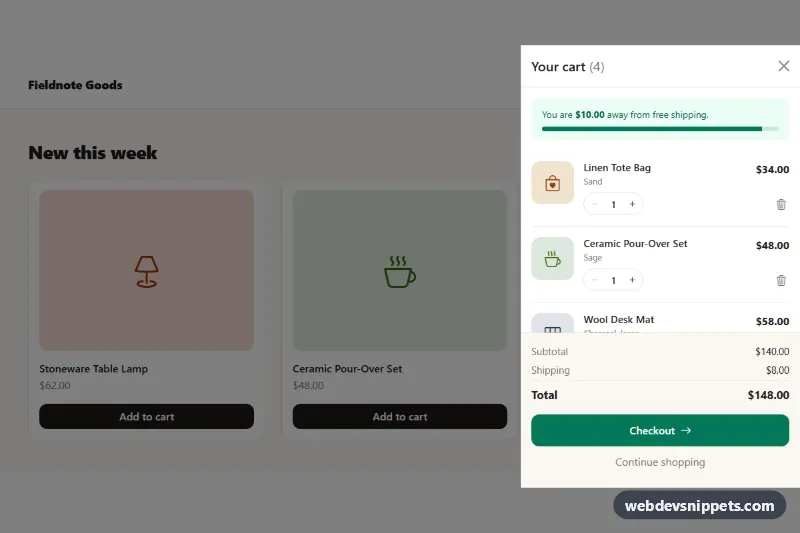
A Bootstrap 5 offcanvas shopping cart that slides in from the right with line items, quantity steppers, remove buttons, a free-shipping progress meter and an order summary. A small product grid with "Add to cart" buttons is included so the drawer can be tried end to end; drop it into any online store header.
How it works
The root .oc-shop holds a header with the .oc-cart-btn toggle (data-bs-toggle="offcanvas", data-bs-target="#oc-cart") and its .oc-badge counter, the product grid, and the aside.offcanvas.offcanvas-end.oc-drawer. The drawer contains the .oc-ship meter (a Bootstrap .progress), the .oc-items list of li.oc-item elements, the .oc-empty message and the .oc-summary footer with subtotal, shipping, total and the .oc-checkout button. Each item stores its unit price in data-price and its identity in data-id.
The drawer starts with the show class, so Bootstrap opens it on page load. Opening, closing, the backdrop, the focus trap and Escape handling all come from Bootstrap's Offcanvas plugin.
The script runs on DOMContentLoaded for every .oc-shop. A single render() function recalculates line prices, the item count in the badge and title, subtotal, shipping and total, formats them with Intl.NumberFormat, and updates the shipping bar width and aria-valuenow. A delegated click listener on .oc-items handles data-oc-step buttons (clamped between 1 and MAX_QTY) and data-oc-remove. Buttons with data-oc-add either raise the quantity of an existing item or clone .oc-item-template, then open the drawer with bootstrap.Offcanvas.getOrCreateInstance(drawer).show().
Customization
data-oc-free-shipping="150"anddata-oc-shipping="8"on.oc-shop: set the free-shipping threshold and the flat shipping fee.data-oc-currency="USD"on.oc-shop: switch toEUR,GBPor any ISO currency code.--oc-accentand--oc-accent-darkon.oc-shopinstyle.css: recolour the badge, shipping meter and checkout button.--oc-drawer-widthon.oc-shop: make the drawer wider or narrower on large screens.MAX_QTYat the top ofscript.js: change the highest quantity per line.- Remove the
showclass from.oc-drawerto keep the cart closed until the cart button is clicked. - Replace
.oc-thumbtiles with<img>elements for real product photos.
Accessibility
The drawer is labelled by its title through aria-labelledby, and the toggle uses aria-controls. The badge number is hidden from screen readers and repeated in .oc-badge-label, so the button reads "Cart, 4 items". Every stepper group has an aria-label naming the product, and each remove button says which item it removes. Changes are announced in the .oc-live status region; after a removal, focus moves to the next remove button or the close button. Disabled minus and plus buttons mark the quantity limits, and transitions are switched off with prefers-reduced-motion.
Usage notes
Requires Bootstrap 5 (added automatically) and Bootstrap Icons. The checkout button only simulates a delay: replace the timeout in its click handler with a fetch() call to your backend. Use a unique drawer id per instance.