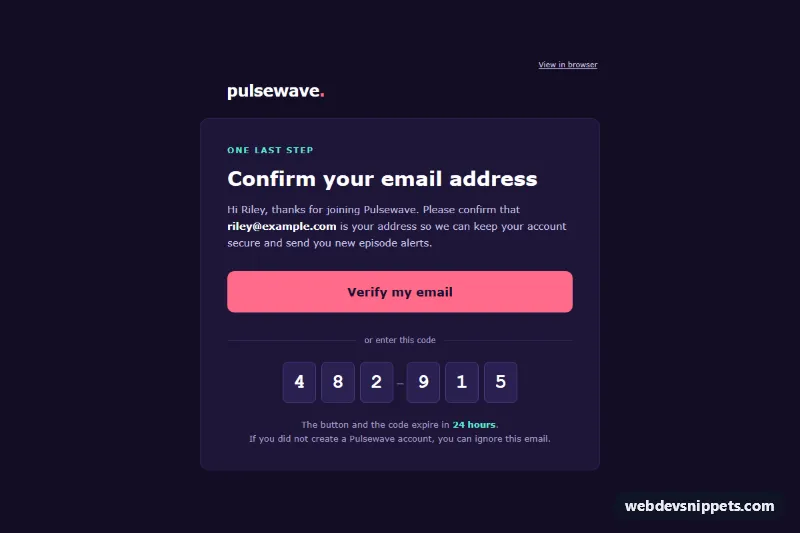
An email-safe "confirm your email address" template with a dark, modern look, built from HTML tables and inline styles with no framework. It keeps the message short: a wordmark, a headline, one sentence of context, a big full-width verify button, a six-digit one-time code as an alternative, an expiry note and a compact footer.
How it works
The hidden .ev-preheader supplies the inbox preview text, including the code. The .ev-wrap table paints the deep purple background and .ev-container holds the 600px message, wrapped in a fixed-width table inside MSO conditional comments for Outlook desktop. Colors are inline and repeated as bgcolor attributes so the dark design survives clients that drop CSS backgrounds.
The card is split into several table rows that share the same background and side borders, which keeps the rounded top and bottom corners while every section stays a plain table row. The verify button is bulletproof: .ev-btn-cell is a full-width padded cell with the coral background and mso-padding-alt, and .ev-btn is a block-level link with matching padding, so the entire bar is clickable.
The "or enter this code" divider is a three-cell row whose side cells hold 1px colored table cells. The code itself is the .ev-code table: each digit sits in its own .ev-digit cell with fixed width, height, line-height and a monospace font, separated by spacer cells and a dash in the middle for readability. No images or web fonts are used.
style.css adds progressive extras only: a hover color for .ev-btn-cell, a focus ring for .ev-btn, and a mobile media query that trims .ev-pad, shrinks .ev-h1 and makes each .ev-digit smaller so the code fits narrow screens.
Customization
- Accent color: replace
#ff6b8bin.ev-btn-celland the wordmark dot, and#5eead4in the eyebrow text and the expiry highlight. - Background: change
#120d24on.ev-wrapand#1d1538on the card rows (all rows of the card must match). - Code length: add or remove
.ev-digitcells and their spacer cells in.ev-code, and update the digits in the preheader. - Digit size: edit
width,height,font-sizeandline-heighton.ev-digit, and the mobile values instyle.css. - Expiry: change "24 hours" in the expiry row to your token lifetime; relative wording never goes stale.
Use cases
- Account sign-ups: a big verify button confirms the new user's email address
- Two-step checks: a six-digit one-time code works as an alternative to the button
- Web apps: a short dark message with an expiry note keeps the focus on verification
- Marketplaces and communities: a compact footer completes a minimal confirmation email
Accessibility
Layout tables use role="presentation", the wrapper declares lang="en", and the heading is a real <h1>. Each digit is plain text, so screen readers read the code in order. The button text is explicit ("Verify my email"), and white and light lavender text on the dark card exceed WCAG AA contrast, as does the dark label on the coral button.
Usage notes
The patterns target Outlook 2016-2021 and Microsoft 365 on Windows, Outlook.com, Gmail (web and apps), Apple Mail and iOS Mail. Some clients recolor dark emails, so test a send first. Copy style.css into a <style> block in the <head> and replace sample-token and the digits with values from your backend.