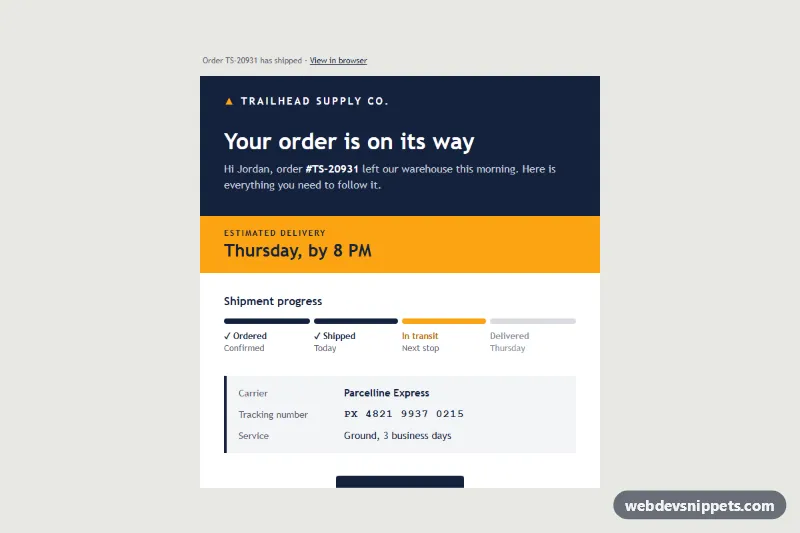
An email-safe shipping confirmation template that tells customers "Your order is on its way". It is built from plain HTML tables with inline styles, no framework, and combines a dark navy header, a bright estimated-delivery band, a four-step progress bar drawn with table cells, carrier and tracking details, a track package button and the list of shipped items with photos.
How it works
The hidden .sc-preheader provides the inbox preview line. The .sc-wrap table paints the light gray page, and .sc-container holds the 600px message, wrapped in a fixed-width table inside MSO conditional comments for Outlook desktop. Every color, font and spacing value is inline, with matching bgcolor attributes for clients that drop CSS backgrounds.
The progress tracker is the .sc-steps table. Its first row has four 25% cells, each holding a nested table with an 8px high colored cell: navy for completed steps, orange for the current one and light gray for what is still to come. The second row holds the .sc-step-label cells with a check mark, the step name and a short status. Only table cells and bgcolor are used, so Outlook's Word engine renders it too.
Carrier, tracking number and service sit in a two-column details table with a navy left border; the tracking number uses a monospace stack. The "Track package" button is a bulletproof padded cell (.sc-btn-cell) around a padded link (.sc-btn) with mso-padding-alt.
style.css only adds progressive extras: a hover color, a focus ring and a mobile media query that trims .sc-pad padding, shrinks .sc-h1 and .sc-eta, stacks every .sc-detail cell and makes the button full width through .sc-btn-table.
Customization
- Progress state: move the orange
#fca311cell in.sc-stepsto another column and switch the others between navy#14213d(done) and gray#d9dbe1(pending); update the matching.sc-step-labeltext. - Brand colors: replace
#14213d(header, button, text) and#fca311(delivery band, logo mark) throughout the markup. - Delivery estimate: edit the text in
.sc-eta; keep it relative, such as a weekday. - Carrier details: change the rows of the details table or add a "Shipping method" row by copying the "Service" row and its
.sc-detailcells. - Items: duplicate an item row; replace the Unsplash photos with your own product images at 192x192.
- Button link: point the
hrefof.sc-btnat your carrier's tracking URL with the tracking number appended.
Accessibility
All layout tables use role="presentation", the wrapper declares lang="en", and the message has a real <h1> and <h2> outline. Progress is described in text, not only by color: each step label states "Ordered", "Shipped", "In transit" or "Delivered" with a status line. Images have descriptive alt text, and white on navy and navy on orange both exceed WCAG AA contrast.
Usage notes
The patterns target Outlook 2016-2021 and Microsoft 365 on Windows, Outlook.com, Gmail (web and apps), Apple Mail and iOS Mail. Insert the snippet into a full email document, copy style.css into a <style> block in the <head> and replace the sample data.