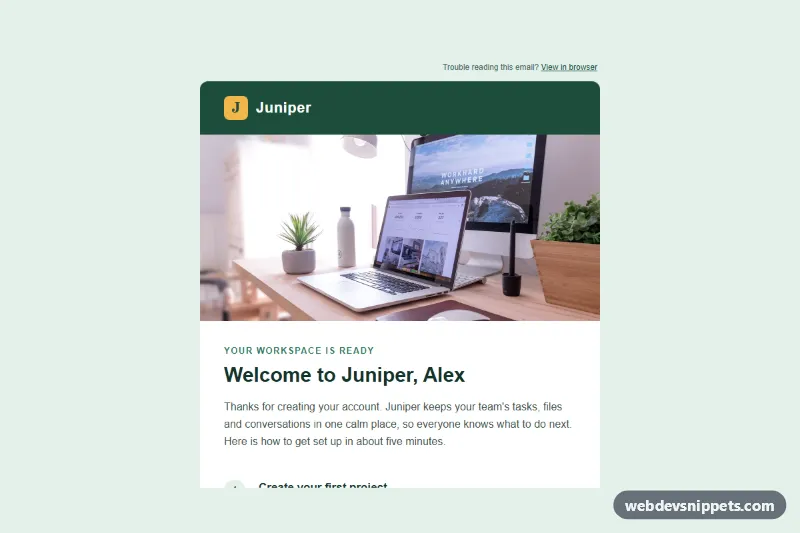
An email-safe welcome email template for a SaaS sign-up, built with plain HTML tables and inline styles, no framework. It opens with a logo header and a full-width hero photo, greets the new user, walks through three numbered getting-started steps and ends with one strong call to action, a help line and a compliant footer.
How it works
The markup starts with a hidden preheader (.we-preheader) that inbox lists show as preview text. Everything else sits in the outer .we-wrap table, which paints the mint page background, and a centered .we-container table capped at 600px with max-width. Outlook desktop ignores max-width, so an MSO conditional comment wraps the container in a fixed 600px table for the Word rendering engine only.
Every visual style is an inline style attribute, and backgrounds are repeated as bgcolor attributes for older clients. The hero <img> has width="600" and height="280" attributes for Outlook plus width:100% and height:auto inline so it scales on phones. The three steps are table rows with a round number cell and a heading plus text. The button is "bulletproof": a padded table cell with a background color and a link that carries its own padding, with mso-padding-alt so Outlook keeps the size.
The optional style.css holds progressive extras only: a hover color for .we-btn-cell, a focus ring for .we-btn, and a mobile media query that tightens .we-pad and .we-outer padding, shrinks .we-h1 and turns the button into a full-width block via .we-btn-table. Clients that strip <style> keep the full inline design.
Customization
- Brand color: replace
#1d4d3ain the header cell, the button cell and the link colors to restyle the template. - Page background: change
bgcolorandbackground-coloron.we-wrap(and the preheadercolor) to match your brand. - Hero photo: swap the
srcof.we-hero. The photo comes from Unsplash; replace it with your own image at 1200x560 and keep thewidth/heightattributes. - Logo: replace the letter cell and the "Juniper" text cell with an
<img>that haswidth,height,altanddisplay:block. - Steps: copy or delete a step row inside the steps table; remove the
border-bottomfrom the last row. - Mobile spacing: edit the padding values for
.we-padin the@media screen and (max-width: 600px)block ofstyle.css.
Accessibility
Layout tables carry role="presentation", so screen readers announce content instead of table structure. Real <h1> and <h2> elements give the message an outline, and the wrapper table has lang="en". The hero image has descriptive alt text, link text is meaningful ("Open your workspace", "Help Center", "Unsubscribe"), and body text keeps contrast well above WCAG AA against white and mint.
Usage notes
The patterns target Outlook 2016-2021 and Microsoft 365 for Windows, Outlook.com, Gmail (web, iOS, Android), Apple Mail and iOS Mail. Wrap the snippet in a full email document with a <head> containing the style.css rules in a <style> block and replace the example.com links with your real URLs.