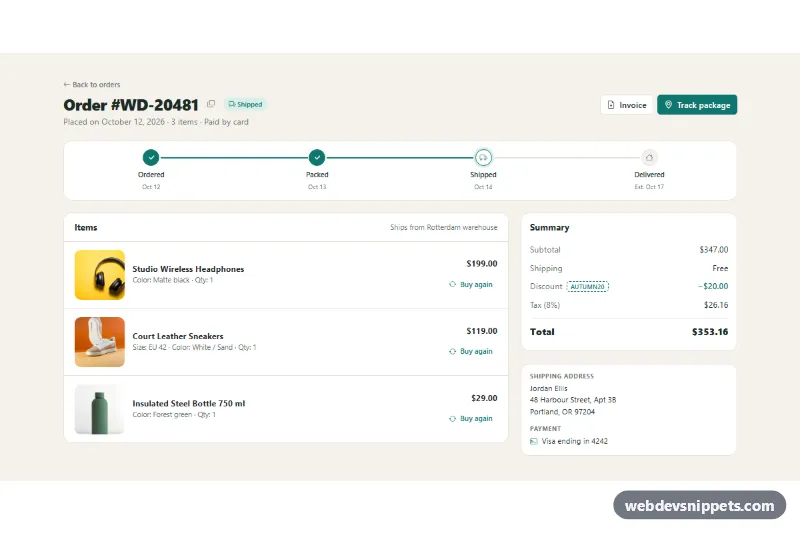
A Bootstrap 5 order details page that shows a single purchase with product photos, a four-step delivery tracker, a price summary, the shipping address and the payment method. Use it as the "view order" screen in a customer account, an order history area or a post-purchase confirmation page.
How it works
The root is section.od-order, a warm off-white band with a container-lg inside. The .od-header row holds the order title with .od-number, a copy button (.od-copy), a pill status badge (.od-badge) and two actions: an outlined Invoice link (.od-btn-outline) and a filled Track package link (.od-btn-primary).
Below it, ol.od-steps is a CSS grid with four .od-step items. Steps with .is-done get a filled teal dot and color the connector line drawn by the next step's ::before; .is-current gets an outlined dot with a soft halo. The main area is a Bootstrap row: the left card lists the products as .od-item grid rows with a square .od-thumb photo, name, variant line, price and a "Buy again" button; the right column has the dl.od-totals summary and an .od-info card with the address and payment.
On DOMContentLoaded the script fills each data-od-day element with a date relative to today. Clicking .od-copy copies the value of its data-copy attribute with the Clipboard API, falling back to a hidden textarea and execCommand('copy') when the API is not available. Clicking .od-again reads data-product, changes the button label to "Added" and shows a message in the Bootstrap toast (.od-toast), created with bootstrap.Toast.getOrCreateInstance.
Customization
--od-accentand--od-accent-softon.od-orderinstyle.css: change the teal used by the tracker, badge, buttons and discount line.--od-bgand--od-line: change the page background and the border color of cards and the tracker.--od-thumb: set the product photo size (default96px); the item grid column follows it.- Move
.is-currentandaria-current="step"to another.od-step(and add.is-doneto the ones before it) to show a different delivery stage. data-copyon.od-copy: the text that is copied, normally your order number.- The comment in the
.od-againclick handler inscript.js: replace the toast with afetch()call to your cart endpoint. delay: 3500inscript.js: how long the toast stays visible, in milliseconds.
Use cases
- Online stores: customers open a past purchase to see product photos, prices, totals and the shipping address
- Customer account areas: the view order screen of an order history list, with Invoice and Track package buttons
- Post-purchase pages: a four-step delivery tracker shows whether the order is packed, shipped or delivered
- Repeat-purchase shops: shoppers reorder an item with the Buy again button and get a toast confirmation
- Support pages: customers copy the order number with one click before contacting help
Accessibility
The section is labelled by the order heading. The tracker is an ordered list with an aria-label, and the active stage carries aria-current="step"; decorative step icons are aria-hidden. The icon-only copy button has an aria-label. Totals use a dl so each label is paired with its amount. The toast has role="status" and aria-live="polite", so copy and cart messages are announced, and its close button is labelled. All buttons keep a visible teal focus ring, and every product photo has descriptive alt text.
Usage notes
Requires Bootstrap 5 (CSS and bundle, added automatically) and Bootstrap Icons. The Clipboard API only works on HTTPS pages; the fallback handles other cases. The product photos come from Unsplash; replace them with your own images.