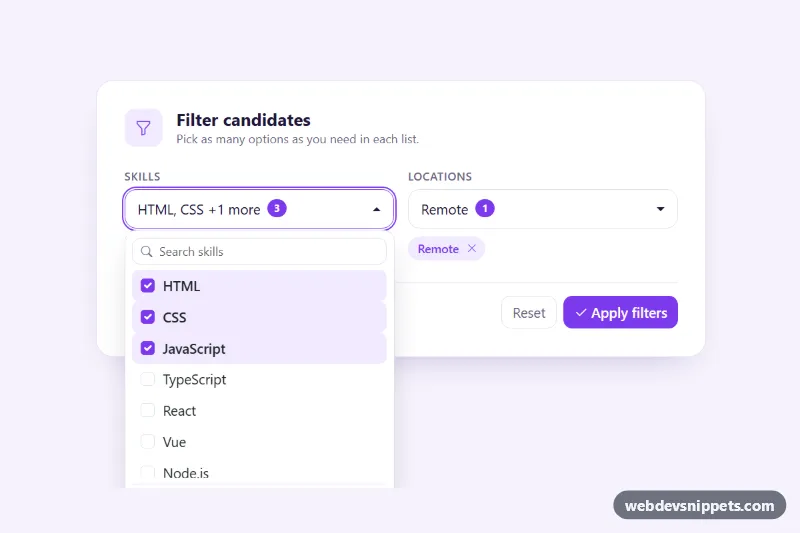
A Bootstrap 5 multi-select dropdown that lets users tick several options from a checkbox list, then shows how many are selected in a count badge and as removable chips below the field. The demo is a candidate filter; the pattern also suits product filters and tag pickers.
How it works
Each field is a .msc-select.dropdown wrapper with a .msc-label, a .msc-toggle button using data-bs-toggle="dropdown", a .msc-menu and a .msc-chips list. The toggle sets data-bs-auto-close="outside", so the menu stays open while users tick several boxes and closes on an outside click or Escape. Inside the menu, the optional .msc-search input sits above .msc-options, a scrollable group of real form-check checkboxes with name and value attributes, followed by .msc-empty and a .msc-footer with Select all and Clear buttons.
The script initialises every .msc-select on DOMContentLoaded. Its render() function reads the checked boxes and writes them into .msc-value (up to MAX_NAMES labels, then "+N more"), updates the .msc-count badge and rebuilds the chips. Typing in the search box hides options whose label does not match; Select all and Clear only affect the options that are currently visible, which makes bulk picks after a search easy. A chip's remove button unchecks its option. Because the values are ordinary checkboxes, the parent form submits them without any extra hidden inputs; the demo form prevents the submit and prints a summary instead.
Customization
--msc-accentin.msc-demo: changes the badge, checked boxes, chips, focus ring and primary button.--msc-menu-heightin.msc-demo: sets how tall the option list grows before it scrolls.--msc-radiusin.msc-demo: rounds or squares the toggle and the menu.data-msc-placeholderon.msc-select: the text shown when nothing is selected, such as "Any skill".data-msc-openon.msc-select: opens that dropdown on page load; remove it for normal behavior.MAX_NAMESat the top ofscript.js: how many option names appear in the button before switching to "+N more".- Delete the
.msc-searchblock from a menu to drop the search field for short lists, as in Locations. - The form
submithandler inscript.js: replace the summary with afetch()call that sendsnew FormData(form).
Accessibility
The toggle is a real button with aria-expanded managed by Bootstrap and an aria-labelledby that combines the field label and the current value, so screen readers hear "Skills, HTML, CSS +1 more". Options are native checkboxes with clickable labels inside a labelled role="group", reachable with Tab and toggled with Space. Opening a menu with search moves focus to the search field, and typing there does not trigger dropdown navigation. Chip buttons have an aria-label such as "Remove CSS" and return focus to the toggle. The .msc-result line is a live region, and focus states use a visible violet outline.
Usage notes
Requires Bootstrap 5 with its JavaScript bundle (added automatically) and Bootstrap Icons. Give each checkbox a unique id when you add more fields.