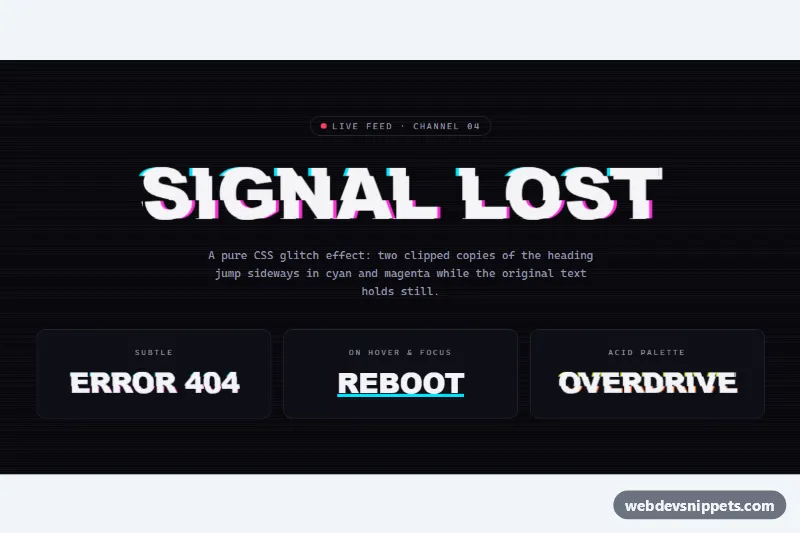
A glitch text effect made with pure CSS, no JavaScript. A big heading flickers with sliced cyan and magenta copies of itself, as if a video signal were breaking up. Below it are three smaller variants: subtle, hover only and an acid palette. It works well for game sites, tech launches, 404 pages and event banners with a cyberpunk look.
How it works
The root section.gt-stage is a dark panel with CRT scanlines, drawn by a repeating-linear-gradient on .gt-stage::after. Any element with the class .gt-glitch and a data-text attribute that repeats its text gets the effect. The ::before and ::after pseudo-elements print that text again with content: attr(data-text) and sit exactly on top of the original.
Each copy has a solid background (--gt-bg) and a colored text-shadow: cyan on the left copy, magenta on the right. The gt-slice-a and gt-slice-b keyframes change clip-path: inset() and transform in hard steps(1, end) jumps. Only a thin horizontal band of each copy shows at a time, and it covers the same band of the original text. The two copies run at different speeds, so the pattern never repeats in an obvious way. The gt-skew keyframes add a short skewX jerk to the whole element twice per cycle. The small .gt-dot in the .gt-kicker badge pulses with gt-pulse.
Customization
--gt-c1and--gt-c2on.gt-stage: the colors of the left and right copies..gt-glitch--acidshows lime and orange.--gt-speed: the length of one glitch cycle..gt-glitch--subtleuses4sfor a calm effect, the acid variant uses1.6s.--gt-shift: how far the colored copies are offset, inem, so it scales with the font size.--gt-bg: must match the color behind the text, or the slices show as visible boxes. Inside.gt-cardit is set to--gt-surface.- Add
.gt-glitch--hoverto a link or button to keep it still until:hoveror:focus-visible. font-sizein.gt-glitch: the main heading usesclamp(2.25rem, 9vw, 7rem), so it fits a phone and grows on desktop.- Remove
.gt-stage::afterto drop the scanlines, or change its gradient stops for thicker lines.
Accessibility
The text is real, selectable HTML, and data-text is shown only by the pseudo-elements. The content: attr(data-text) / "" declaration gives the generated copies empty alternative text, so screen readers read each word once. Browsers without that syntax use the plain content line instead. The badge dot is aria-hidden. The hover link shows a pink :focus-visible outline and glitches on keyboard focus as well. With prefers-reduced-motion: reduce all animations stop, and one frozen, still-readable glitch frame stays on screen. White text on the near-black stage has a contrast ratio well above 15:1.
Usage notes
Keep data-text in sync with the visible text, including case, or the copies will not line up. Avoid using the effect on long paragraphs, because constant flicker makes body text tiring to read.