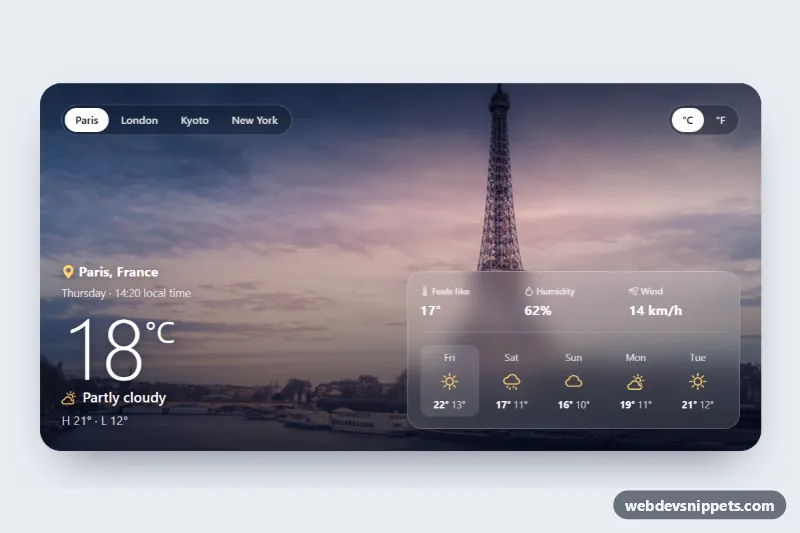
A Bootstrap 5 weather card laid over a full-bleed photo of the selected city, with a city switcher, a Celsius/Fahrenheit toggle, current conditions, three key stats and a 5-day forecast on a frosted glass panel. Use it on travel sites, city guides or dashboards.
How it works
The card is article.card.wc-card inside the .wc-wrap demo wrapper. .wc-photos stacks one img.wc-photo per city, each tagged with data-city; only the photo with .is-active is visible, and switching cities crossfades the opacity while the new photo eases out of a slight zoom. A gradient in .wc-card::after darkens the top and bottom so white text stays readable on any photo.
.wc-content sits above the photos. The top row holds two .wc-seg pill groups built from Bootstrap btn-check radio inputs: the cities and the temperature unit. The bottom row is a Bootstrap row: .wc-now shows the place, local time, big temperature, condition icon and high/low; .wc-glass uses backdrop-filter for the frosted panel with the dl.wc-stats (feels like, humidity, wind) and the ul.wc-days forecast.
All values come from the CITIES object in script.js, stored in Celsius and km/h. On DOMContentLoaded the script initialises every .wc-wrap, makes the radio names and ids unique per card, and listens for change on both radio groups. render() fills every element with a data-wc attribute, swaps the condition icon class, rebuilds the forecast list, converts to Fahrenheit and mph when °F is selected, and moves .is-active to the matching photo. The markup ships with the Paris values.
Customization
CITIESinscript.js: add a city (key, place, time, values and five forecast days), then add a matching radio input and animg.wc-photowith the samedata-cityvalue.--wc-accenton.wc-wrapinstyle.css: changes the color of the weather icons and the location pin.--wc-shade: adjust the photo overlay gradient; make it darker for bright photos.--wc-glassand--wc-glass-border: change the transparency of the frosted stats panel.--wc-radius: corner radius of the card (default1.75rem).checkedon#wc-unit-f: start in Fahrenheit for a US audience.min-height: 480pxin.wc-cardand.wc-content: make the card taller to show more of the photo.
Use cases
- Travel sites: visitors switch between city photos and see current conditions before booking
- City guides: a frosted glass card shows weather over a photo of each destination
- Dashboards: compact weather block with feels like, humidity and wind plus a 5-day forecast
- Hotel and tourism pages: let guests check the local time and forecast for the destination
- International audiences: a Celsius and Fahrenheit toggle serves both metric and US visitors
Accessibility
Both pill groups are radiogroup elements with an aria-label and native radio inputs, so arrow keys switch cities and units, and the focused pill gets a yellow outline. A visually hidden role="status" region announces the new city, temperature and condition after each change. Inactive photos get aria-hidden="true" so only the current city's alt text is read. Forecast icons are hidden from screen readers and replaced by visually hidden labels such as "Rain,". The photo transition is turned off with prefers-reduced-motion.
Usage notes
Requires Bootstrap 5 (added automatically) and Bootstrap Icons. The weather data is static sample data; fill CITIES from a fetch() call to your weather API before the first render(). .wc-wrap uses min-height: 100vh for the demo; remove it when embedding the card. The city photos come from Unsplash; replace them with your own images.