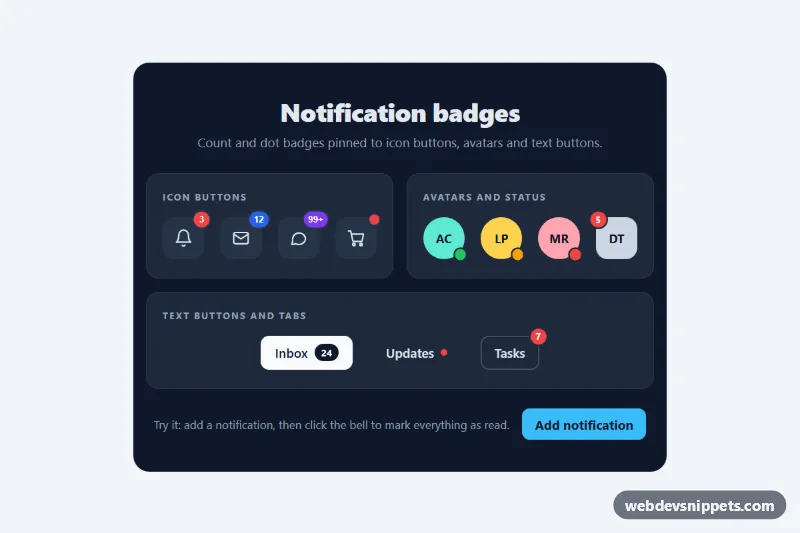
A set of notification badges built with pure CSS: red count bubbles and small status dots pinned to the corner of icon buttons, avatars and text buttons. A few lines of vanilla JavaScript keep counts and labels in sync for app headers, inboxes and carts.
How it works
The root section.nb-showcase contains three .nb-panel cards. Every element that carries a badge (.nb-icon-btn, .nb-avatar, .nb-text-btn) is position: relative, so the absolutely positioned .nb-badge or .nb-dot sits on its top-right corner and is pushed half outside with transform: translate(35%, -35%). A box-shadow ring in the color of --nb-ring cuts the badge out of the button behind it.
.nb-badge uses min-width plus horizontal padding, so one digit gives a perfect circle and longer values such as 99+ grow into a pill. .nb-dot is a fixed-size circle; .nb-dot--pulse adds a ::after ring that scales and fades out to draw attention. .nb-dot--bottom moves the dot to the bottom-right corner for presence indicators (.nb-dot--online, .nb-dot--away, .nb-dot--busy), and .nb-dot--inline puts a small dot next to a label.
The script reads data-nb-count on each counted .nb-icon-btn. A click on that button resets the count to zero and hides the badge with .is-hidden (a scale-out transition). The demo button with data-nb-add adds one to the first counted button and replays a short bump animation. Counts above 99 are shown as 99+. Without JavaScript all badges are still displayed with their static values.
Customization
--nb-badge-bgand--nb-badge-texton.nb-showcase: the default badge color, e.g. an orange#f97316for a softer alert style..nb-badge--blueand.nb-badge--violet: color modifiers that override--nb-badge-bgfor a single badge; add your own in the same way.--nb-badge-sizeand--nb-dot-size: the height of count badges and the diameter of dots, for larger touch targets or denser toolbars..nb-badge--top-left: moves a count badge to the opposite corner, as on the "DT" avatar.--nb-ring: the cut-out ring color; set it to the background behind the button so the badge looks detached.MAXinscript.js: the cap above which a+is shown, e.g.9for a compact9+.data-nb-labelon a button: the word used to build the updatedaria-label, such as "Messages, 12 unread".
Accessibility
Visual badges are aria-hidden="true"; the meaning lives in the button's aria-label ("Notifications, 3 unread"), which the script rewrites whenever the count changes. Avatars use role="img" with a label that includes the status, and text buttons contain visually hidden .nb-sr text such as "unread" or "(new)". A polite aria-live region announces changes. All buttons and links have a clear :focus-visible outline in --nb-focus. With prefers-reduced-motion: reduce the pulse, bump and scale transitions are switched off.
Usage notes
The demo text and "Add notification" button are for the preview only. In a real app call your own code to set data-nb-count and the badge text when new data arrives. Several showcases can share one page because the script scopes each to its own root.