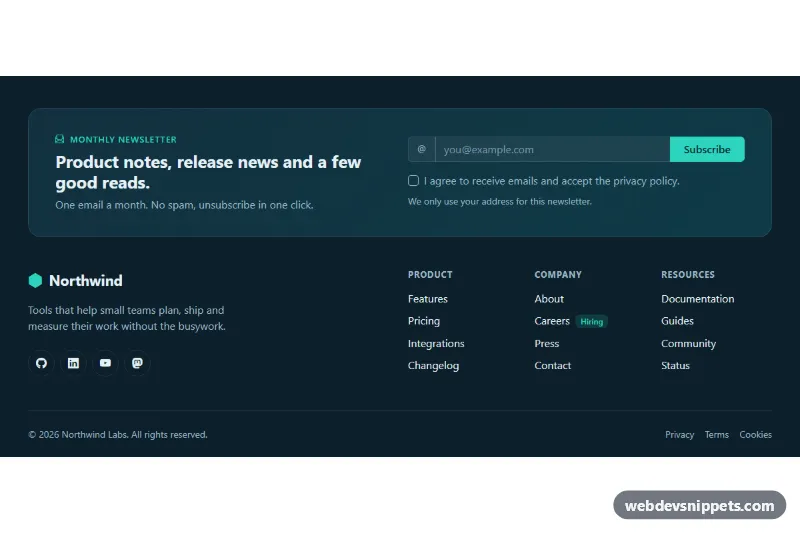
A dark Bootstrap 5 site footer that combines a newsletter signup panel with brand info, social links, three link columns and a legal bar. Use it at the bottom of SaaS sites, product landing pages and blogs where you want to collect subscribers without a separate section.
How it works
The root is footer.fn-footer, which defines its own palette with CSS custom properties and contains a Bootstrap container. At the top, .fn-signup is a rounded gradient panel split into two columns at the lg breakpoint: the pitch text on the left and form.fn-form on the right. The form uses a Bootstrap input-group with an icon, the email field and the .fn-submit button, followed by a consent checkbox, a help line and the .fn-status message.
Below the panel, the .fn-links row holds the brand block (logo mark, short text and the round .fn-social icon links) and three nav columns: Product, Company and Resources. The grid stacks to two columns on phones and expands to the full row on large screens. .fn-bottom closes the footer with the copyright line and legal links.
The script runs on DOMContentLoaded for every .fn-footer. It writes the current year into .fn-year, then handles the form submit event: it adds Bootstrap's was-validated class, updates aria-invalid and aria-describedby, and moves focus to the first invalid field. Valid submissions show a spinner, change the button label to "Subscribing…", and after a 900 ms timeout display a confirmation in .fn-status and reset the form. Without JavaScript the links still work, but the form has no submit handling.
Customization
--fn-accentin.fn-footer: changes the teal used by the button, eyebrow text, focus outlines, checkbox and link hover.--fn-bgand--fn-surfacein.fn-footer: set the footer background and the starting color of the.fn-signupgradient.- The
window.setTimeoutcall inscript.js: replace it withfetch()to your newsletter provider and show.fn-statuswhen the request resolves. offset-lg-2on the Product column: remove it to pull the link columns closer to the brand block..fn-badgeon the Careers link: reuse it next to any link to highlight new pages, or delete it.padding: 3rem 0 1.5remin.fn-footer: increase it for a roomier footer on long landing pages.
Accessibility
The footer has a visually hidden heading, and each link column is a nav labelled by its own heading through aria-labelledby. Social icons are links with descriptive aria-label values and hidden icons. The email field has a visually hidden label, an aria-describedby help text and aria-invalid that tracks the field state. The submit button gets aria-disabled instead of disabled while sending, so focus is not lost. .fn-status is a polite live region, links and buttons have a visible teal outline on :focus-visible, and the link color transition is turned off for prefers-reduced-motion.
Usage notes
Requires Bootstrap 5 (loaded automatically) and Bootstrap Icons. If you place several footers on one page, change the ids such as fn-email and fn-consent so they stay unique.