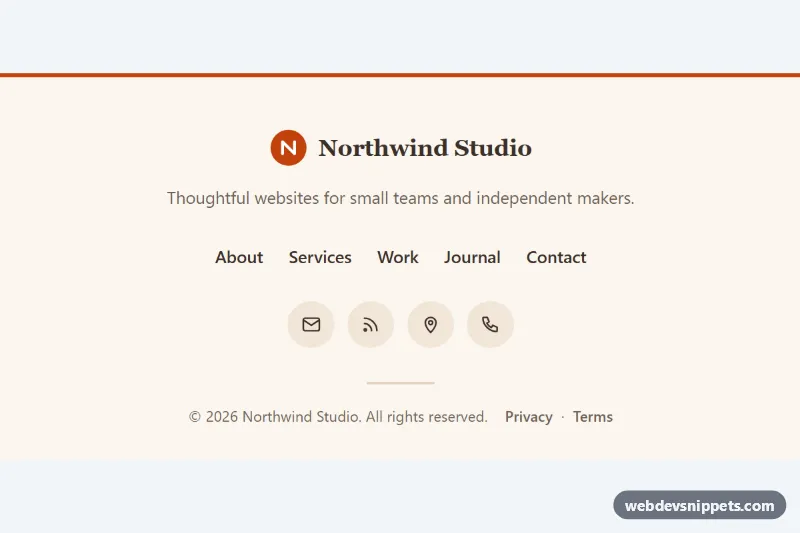
A minimal centered footer built with pure CSS and a tiny bit of vanilla JavaScript. It stacks a logo, a short tagline, a row of footer links, round contact icons and a copyright line on a warm cream background, which makes it a good fit for portfolios, small business sites, blogs and landing pages.
How it works
The root footer.cf-footer sets every color as a custom property and centers its content with text-align: center. Inside, .cf-inner limits the width with --cf-max. The .cf-brand link holds an inline SVG .cf-logo (a filled circle with a monogram) and the .cf-name set in a serif font. Below the .cf-tagline, a nav.cf-nav contains the ul.cf-links list; it uses flexbox with flex-wrap, so the links wrap onto two centered rows on narrow phones.
Each .cf-link has an ::after underline that is scaled to zero with transform: scaleX(0) and grows from the middle to full width on hover and keyboard focus. The ul.cf-social row holds four round .cf-icon links with stroke icons that fill with the accent color and lift slightly on hover. A short hr.cf-rule separates the copyright line, .cf-copy, which stacks the text and the .cf-legal links on phones and puts them side by side from 560px.
The script finds every .cf-footer on DOMContentLoaded and writes the current year into each element with data-cf-year. Without JavaScript the year written in the markup is shown.
Customization
--cf-accenton.cf-footer: changes the top border, the logo circle, the link underline, the hover color and the focus outline.--cf-bg,--cf-textand--cf-muted: set the background and text colors; use a dark--cf-bgwith light text for a dark footer.--cf-icon-bg: the resting background of the round.cf-iconbuttons.--cf-max: the maximum width of.cf-inner; raise it if you add more links.gap: 0.25rem 1.5remin.cf-links: controls the row and column spacing between the footer links.- Remove the
border-topfrom.cf-footerfor a borderless footer that blends into the page. - Replace the
.cf-logoSVG and the.cf-nametext with your own brand mark.
Use cases
- Portfolios: a centered logo, tagline and round icon links close the page cleanly
- Small business sites: footer links wrap onto centered rows on narrow phones
- Blogs: a copyright line with legal links updates its year automatically
- Landing pages: contact icons and animated link underlines give a light finish without a big footer
Accessibility
The links sit in a nav landmark labelled "Footer", and the icon list has aria-label="Social media". Every icon-only link has its own aria-label, while the SVGs are aria-hidden and not focusable. The brand link is labelled as the home link. All interactive elements show a 3px :focus-visible outline in the accent color, the icon links are 44px touch targets, and the text colors keep readable contrast on the cream background. With prefers-reduced-motion: reduce the underline animation and the hover lift are switched off.
Usage notes
Place the footer at the end of your page body. Several instances can share a page; the script updates the year in each one.