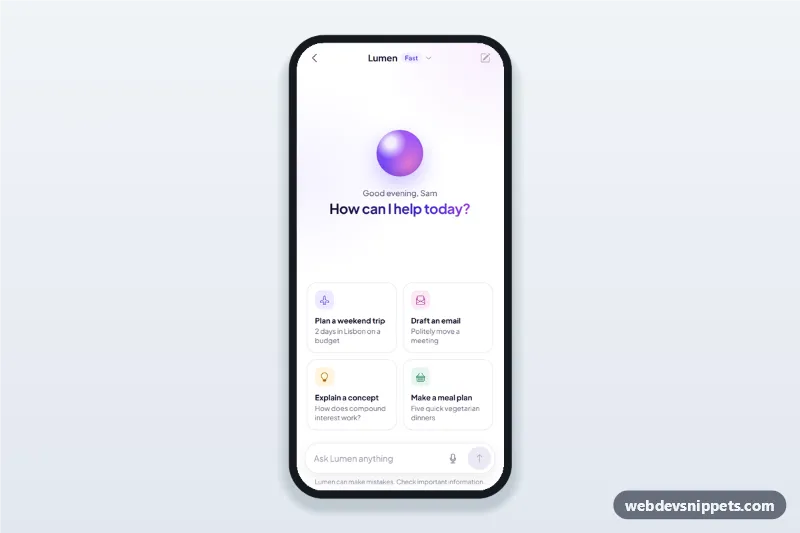
An AI assistant chat screen built with Bootstrap 6: an HTML mobile template with a greeting and suggestion cards on the empty state, answers that stream in word by word, copy and regenerate buttons, a stop button and a voice input button. Use this AI chatbot UI for support assistants, writing helpers and in-app copilots, as a PWA or packaged with Capacitor.
How it works
The root .aac-app is a 430 px app column with a sticky top bar (.aac-bar) and a sticky composer (.aac-compose).
- Empty state:
.aac-emptyshows a gradient orb, a greeting that changes with the time of day (.aac-daypart) and four.aac-cardsuggestions. Tapping a card sends its prompt from theANSWERSobject. - Conversation: messages go into
.aac-log(role="log"). The user bubble is.aac-msg-user; the assistant reply (.aac-msg-bot) first shows thinking dots, thenstreamAnswer()types paragraphs and list items in word by word with a blinking caret. - While streaming, the send button turns into a stop button (
.is-stop); after it ends,.aac-actionsshows Copy (Clipboard API with a textarea fallback and a Bootstrap 6 Toast) and Regenerate. - Composer: the textarea grows with its content, Enter sends and Shift+Enter adds a new line. The send button stays disabled while the field is empty.
- Voice:
.aac-mictoggles a listening state with an animated wave and then fills in a sample transcript. Escape cancels it. - Model menu: the title is a Bootstrap 6 Menu (
data-bs-toggle="menu") for the response style; the choice updates.aac-model-mode.
Customization
--aac-gradand--aac-violeton.aac-app: the gradient for the send button, assistant avatar and voice wave, and the accent color.ANSWERSinscript.js: the prompt and answer blocks for eachdata-keysuggestion card; add cards with new keys.answerFor(): replace it with a streamingfetch()to your AI endpoint and pass the chunks tostreamAnswer().- The
30ms delay instep(): the typing speed of streamed answers. stopListening()and the mic handler: swap the demo transcript for the Web Speech API or a native speech plugin..aac-tone-1to.aac-tone-4: the icon tile colors of the suggestion cards.
Use cases
- Customer support apps: an assistant that answers order and account questions.
- Productivity and writing apps: drafting emails, summaries and plans.
- Learning apps: a tutor that explains concepts step by step.
Accessibility
The conversation is a role="log" region with aria-live="polite" and aria-busy while an answer streams, so screen readers read finished answers instead of every word. The composer has a visually hidden label, icon buttons have aria-labels, the mic button uses aria-pressed, and the listening text has role="status". With prefers-reduced-motion the answer appears at once and the caret, dots and wave stop animating.
Bootstrap 6 notes
Built on Bootstrap 6.0.0-alpha.1 (alpha APIs can still change). The response style picker uses the new Menu (.menu, .menu-item, .menu-item-description) instead of dropdown-menu, toasts are shown with Toast.getOrCreateInstance, and icon buttons use btn-icon.