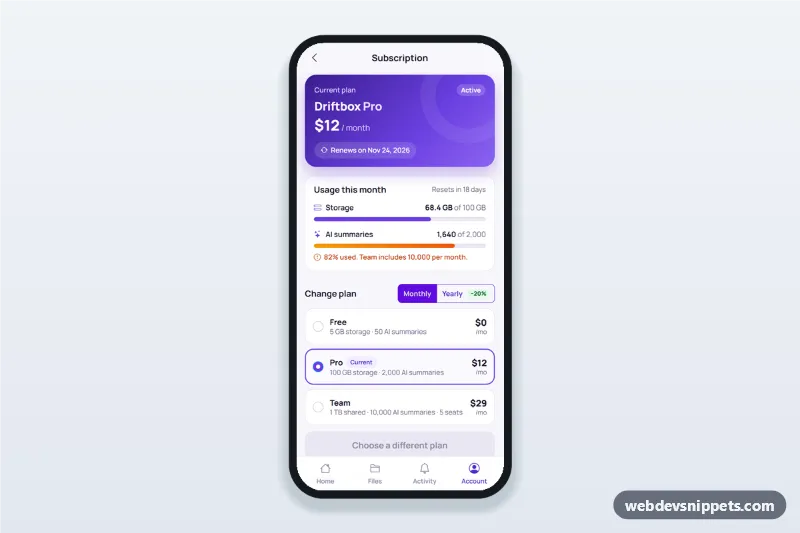
A subscription and billing screen built with Bootstrap 6: an HTML mobile template with a current plan card, usage bars, a monthly/yearly plan switcher with a proration summary, the saved payment method with an update form, an invoice list and a cancel flow. Use this manage subscription page and billing settings UI in SaaS, storage and productivity apps, as a PWA or packaged with Capacitor.
How it works
The root .sbb-app is a 430 px app column with a sticky top bar (.sbb-bar) and a bottom tab bar (.sbb-tabs).
- Plan card:
.sbb-planshows the plan, price and the renewal date.RENEW_IN_DAYSinscript.jssets the date relative to today, so it never goes stale. - Usage:
.progressbars;.is-highturns one orange. - Plan switcher: a Bootstrap 6 toggle
btn-group(label.btn-checkwith the radio inside) picks monthly or yearly, and.sbb-optionrows use the.radioinput.refreshPlans()swaps prices betweendata-monthanddata-yearand enables.sbb-changeonly when the choice differs from the current plan. - Change sheet: a Bootstrap 6 Drawer (
#sbb-change-sheet) shows the new price, a credit for the unused days and the amount due today. Confirming updates the plan card and badge. - Payment method: "Update" opens
#sbb-card-sheetwithcc-name,cc-number,cc-expandcc-cscfields. The number is checked with the Luhn algorithm and the expiry must be in the future; focus moves to the first error. - Invoices:
.sbb-invoicerows are built fromdata-months, one per month before the renewal date. - Cancel:
.sbb-cancelopens#sbb-cancel-sheet; confirming marks the plan as ending and turns the link into "Resume subscription".
Customization
--sbb-violeton.sbb-app: the primary color for buttons, selected plans and progress bars (with--bs-primary-bg).data-monthanddata-yearon eachname="sbb-plan"radio: the plan prices.RENEW_IN_DAYSinscript.js: days until renewal, which also drives the credit in the change sheet.- Change
.sbb-w-68and.sbb-w-82(andaria-valuenow) to show real usage. - Replace the demo code in the
.sbb-confirmand card form handlers with calls to your billing provider's SDK.
Use cases
- SaaS and productivity apps: plan, usage limits and invoices in one account screen.
- Cloud storage apps: storage meter with an upgrade path.
- Streaming and membership apps: switch between monthly and yearly billing.
Accessibility
Plans and billing periods are native radio buttons, so arrow keys move between them. Card fields use the right autocomplete and inputmode values, and invalid fields get aria-invalid with messages linked through aria-describedby. Sheets are native modal <dialog> elements that close with Escape or the backdrop, and focus moves to the first useful control. Touch targets are at least 44 px.
Bootstrap 6 notes
Built on Bootstrap 6.0.0-alpha.1 (alpha APIs can still change). Sheets use the new Drawer instead of Offcanvas, the period toggle uses label.btn-check btn-outline theme-primary with the input inside, plans use .radio instead of form-check-input, badges use badge-subtle theme-*, and fields use .form-field.