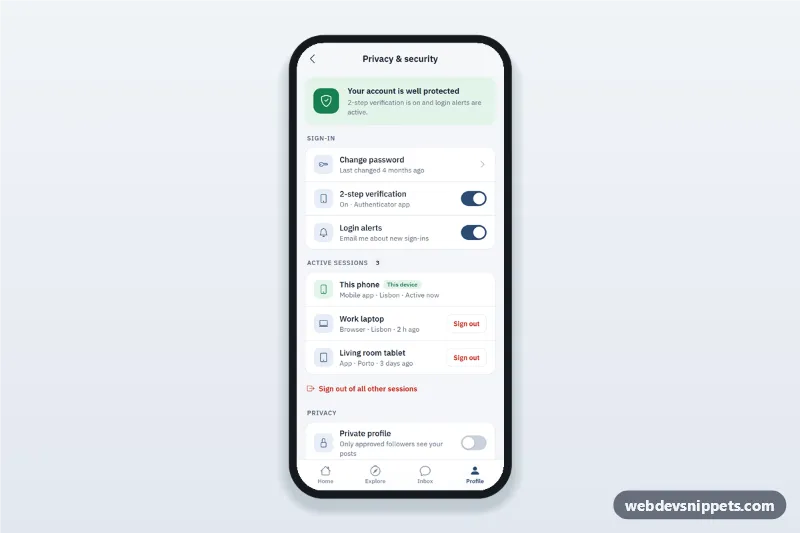
A privacy and security settings screen built with pure CSS and vanilla JavaScript: a security status card, a two-factor authentication switch, a change password bottom sheet with validation, an active sessions list with sign out, privacy toggles and a delete account confirmation dialog. It is an HTML mobile template for mobile sites and PWAs and can be packaged with Capacitor. Use it as the account security settings page of a social, banking, shopping or SaaS app.
How it works
The root .ps-app is a phone-width column (max 430px, centred on wide screens) with a sticky top bar, grouped .ps-card lists and a sticky .ps-tabs bar. Each setting is a .ps-row; toggles are real checkboxes with role="switch" styled as .ps-switch, wrapped in a label so the whole row is a large touch target.
The [data-ps-status] card reflects the 2-step verification and login alert switches. When either is turned off it switches to the amber .is-warn state and explains what to fix; a toast confirms the change.
In Active sessions, every [data-ps-session] row has a Sign out button. Signing out removes the row and updates the count. "Sign out of all other sessions" clears the rest and is disabled when only this device is left.
Change password opens [data-ps-sheet="password"], a native <dialog> bottom sheet that validates the current password, a new one of 8+ characters with a number, and the confirmation, with a strength meter and show/hide button. Delete account opens [data-ps-sheet="delete"]; the red button only works after typing the CONFIRM_WORD, then a success panel is shown.
Customization
--ps-accentand--ps-accent-softon.ps-app: the slate blue of switches, icons, primary buttons and the active tab.--ps-dangerand--ps-danger-soft: the red used for sign out, the danger zone and the delete dialog.--ps-okand--ps-warn: the colours of the status card in the safe and warning states.CONFIRM_WORDinscript.js: the word users must type to delete the account.strength()inscript.js: the rules behind the password meter.- The
setTimeoutcalls in the password and delete handlers: replace them with yourfetch()calls; the sign out handler has a comment where the session API call goes.
Use cases
- Social and community apps: two-factor authentication, private profile and activity status.
- Banking and fintech apps: review signed-in devices and sign out of lost ones.
- Online stores: let customers change their password and download their data.
- SaaS and productivity PWAs: a clear, guarded path to delete an account.
Accessibility
Switches use native checkboxes with role="switch" and aria-describedby for their subtitles, so Space toggles them. Form errors are linked with aria-describedby and aria-invalid, and the first invalid field gets focus. Escape or the backdrop closes the sheets and focus returns to the row that opened them. The status card and toast are live regions, all rows are at least 64px high, and motion is reduced with prefers-reduced-motion.