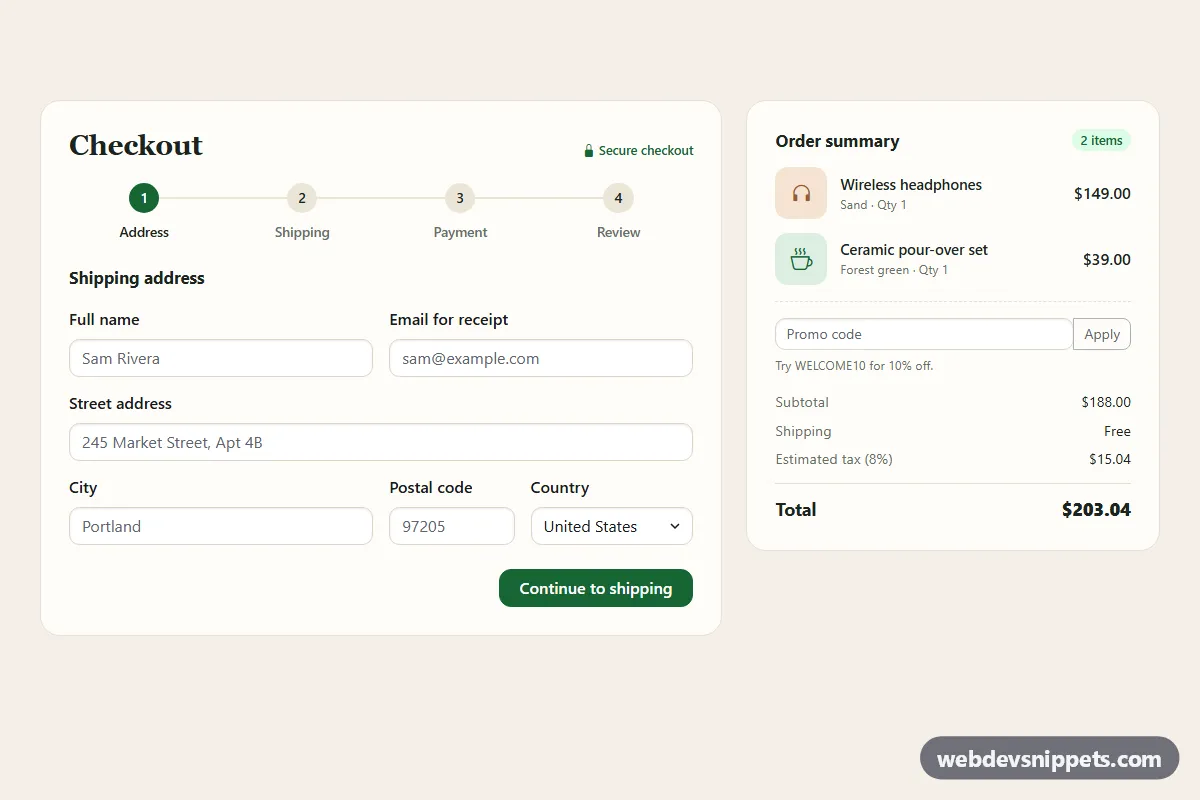
A four-step checkout form for Bootstrap 6: shipping address, shipping method, payment and a final review, next to a live order summary. It suits online stores and booking pages. A Bootstrap 6 stepper shows progress, and totals update when the delivery option or promo code changes.
How it works
The root .cko-root holds two cards: .cko-main with the form and .cko-summary with items and totals. Above the form, .stepper with sm:stepper-horizontal sits inside a .contains-inline wrapper, so it turns horizontal when the card is at least 576px wide and stays vertical on phones.
Each step is a <fieldset class="cko-panel"> with a data-cko-panel number. The submit button moves forward only when every field in the visible panel passes checkValidity(); failed fields get .is-invalid and focus. The country field is a Bootstrap 6 Combobox (data-bs-toggle="combobox", data-bs-search="true", data-bs-name="country") with United States preselected through .selected.
Shipping options are .form-field-card radios with data-cko-price, data-cko-days and data-cko-label. The deliveryDate() helper counts business days from today, so arrival dates never go stale. updateTotals() recalculates discount, shipping, 8% tax and the total.
Payment fields format themselves as the user types. customRules() adds a Luhn check for the card number and rejects past expiry dates through setCustomValidity(). The review step fills .cko-r-address, .cko-r-shipping and .cko-r-payment, and each data-cko-goto button jumps back to that step. Placing the order shows a spinner, then the .cko-success panel with an order number and arrival date.
Customization
--cko-brand,--cko-bgand--cko-paperon.cko-root: change the green accent (buttons, stepper, radios, checks) and the page and card colors.data-cko-subtotalon.cko-totals: set the cart subtotal that every total is based on.TAX_RATEandPROMO_CODESat the top ofscript.js: adjust tax and add discount codes such as{ SPRING20: 0.2 }.data-cko-priceanddata-cko-dayson each shipping radio: change prices and delivery estimates.- Add
.menu-itembuttons withdata-bs-valueto the country menu to support more countries. - Replace the
setTimeoutin the submit handler with afetch()POST ofnew FormData(form).
Use cases
- Online stores: four steps cover address, shipping, payment and a final review
- Order flows: a stepper shows where the customer is in the checkout
- Cart and payment pages: live order totals update with the shipping choice and a promo code
- International shops: a country select and card checks validate the details before ordering
Accessibility
Every step is a <fieldset> with a visible <legend>. Errors are linked with aria-describedby and announced through aria-invalid. Focus moves to the first field of each step, to the first invalid field on error, and to the success panel at the end. The Edit buttons include visually hidden text such as "Edit address".
Usage notes
Never collect raw card numbers on your own server: in production, swap the payment fields for your payment provider's hosted fields. The Combobox keeps its choice after "Start a new order", because it has no public reset method in the alpha. In alpha.1 the Combobox also logs a harmless "more than one instance" console error.
Bootstrap 6 notes
Bootstrap 5's .form-select is replaced by the new Combobox. .form-check radios become .radio inside .form-field-card, btn-primary is btn-solid theme-primary, and the icon inside the card field uses .form-adorn. The .stepper component is new in Bootstrap 6. Built on Bootstrap 6.0.0-alpha.1, so APIs may still change.