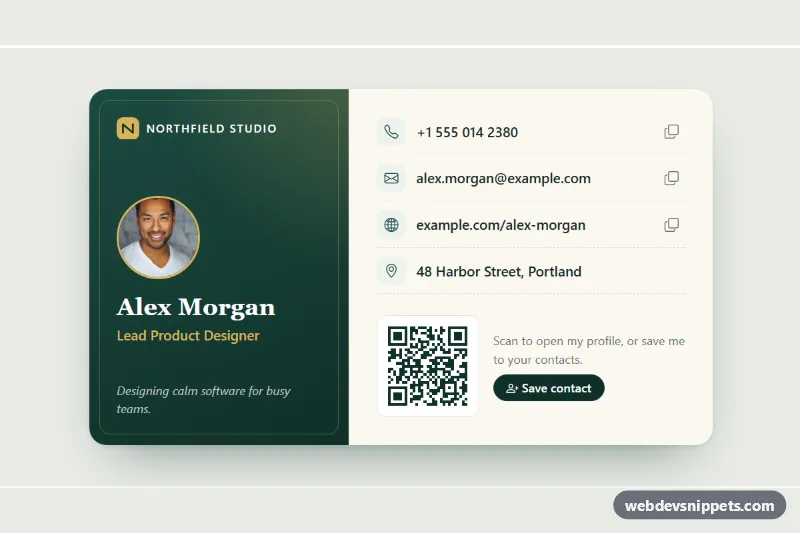
A digital business card built with Bootstrap 5: a deep green brand side with portrait, name and role, and a paper-colored details side with tap-to-call links, copy buttons, a scannable QR code and a "Save contact" button that downloads a vCard. Use it on personal sites, team pages, link-in-bio pages or conference badges.
How it works
The root article.bcc-card sits inside the .bcc-wrap background and is split by a Bootstrap row g-0 into .bcc-front (col-md-5) and .bcc-back (col-md-7). On phones the two sides stack. The front uses a green gradient with a soft gold glow, and a ::after pseudo-element draws the thin inset gold frame that gives the printed-card look. It holds the inline SVG company mark, the round .bcc-photo, the serif .bcc-name, the gold .bcc-role and a short tagline.
The back is a list of .bcc-item rows. Each row has a .bcc-icon tile, a .bcc-value link (tel:, mailto: or a web URL) and, where useful, a .bcc-copy button. Below the list, .bcc-qr holds a real QR code drawn as one SVG path, so it stays sharp at any size and needs no library.
The script runs on DOMContentLoaded for every .bcc-card. Copy buttons read data-bcc-copy, try navigator.clipboard.writeText and fall back to a hidden textarea, then swap the icon to a check mark and write the result into .bcc-status. The buildVcard() function turns the data-bcc-name, data-bcc-title, data-bcc-org, data-bcc-phone, data-bcc-email and data-bcc-url attributes on the card into a vCard 3.0 file and sets it as a Blob URL on .bcc-save.
Customization
--bcc-green,--bcc-green-2and--bcc-goldin.bcc-wrap: recolor the brand side, icons, button and photo ring.--bcc-radiusin.bcc-wrap: round or square off the card and its inner frame together.- The
data-bcc-*attributes on.bcc-card: change the details that end up in the downloaded vCard. data-bcc-copyon each.bcc-copybutton: set the exact text that is copied, for example a phone number without spaces.- The
pathinside.bcc-qr svg: replace it with a QR code for your own URL, generated by any QR tool as SVG. max-width: 720pxin.bcc-card: make the card wider or narrower;col-md-5andcol-md-7set the split between the sides.download="alex-morgan.vcf"on.bcc-save: change the file name of the downloaded contact.
Accessibility
The card is an article labelled by the name heading. Each contact link has a visually-hidden prefix such as "Email:", and every copy button has its own aria-label. The QR code is an SVG with role="img" and a title that says where it leads. .bcc-status is a polite live region, so copy and download results are announced. Links and buttons show a gold focus outline with a dark ring, and decorative icons are aria-hidden.
Usage notes
Requires Bootstrap 5 (added automatically) and Bootstrap Icons. The portrait comes from Unsplash; replace it with your own photo. Clipboard access and downloads can be blocked inside sandboxed preview frames; both work on a normal page.