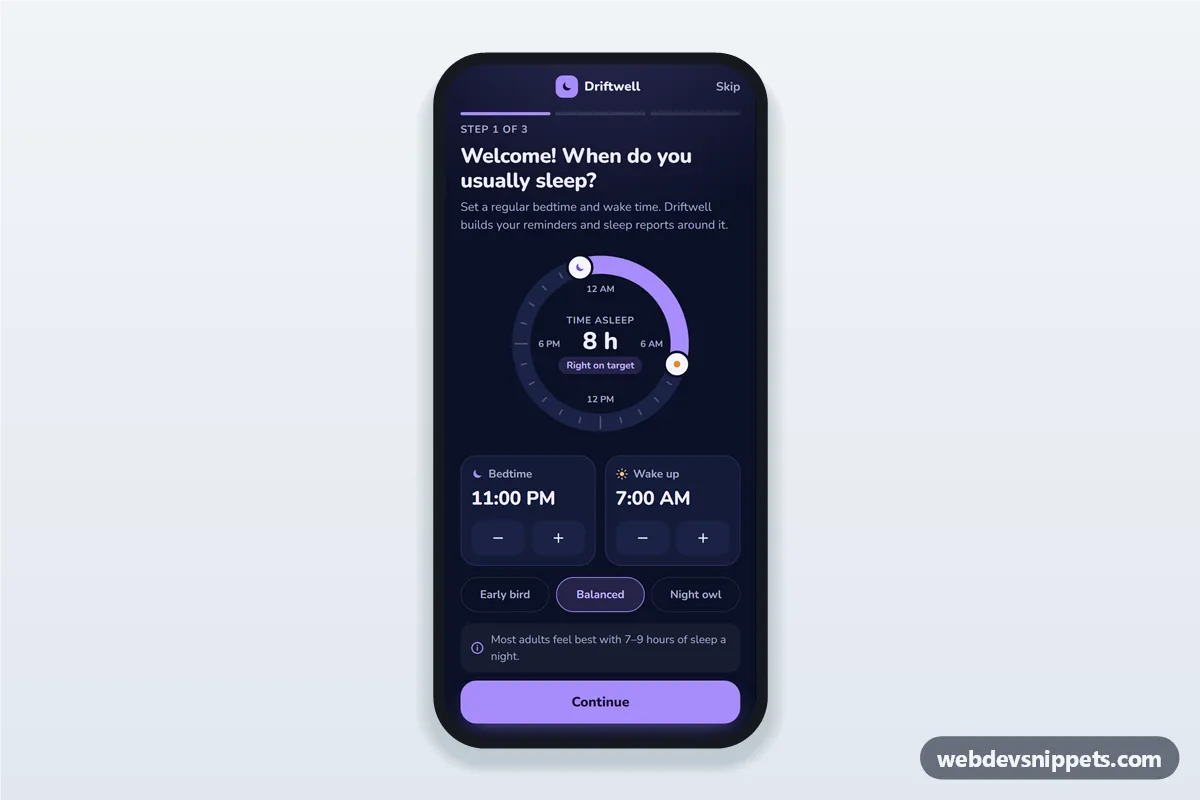
A dark sleep tracker onboarding screen in pure CSS and vanilla JavaScript: a welcome step with a bedtime picker and wake time picker, a 24-hour sleep dial that shows the sleep duration, and a notification opt-in step. It is an HTML mobile template for mobile sites and PWAs and can be packaged as a native app with Capacitor. Use it as the first-run flow of a sleep app UI, a sleep schedule setup screen or a wellness tracker.
How it works
The root .sto-app is a 430 px app column with a compact top bar (Back, the Driftwell brand, Skip), three .sto-seg progress segments and three [data-sto-panel] steps. A sticky .sto-footer holds the main button, whose label changes per step.
Step 1 shows two .sto-time cards. Each time value is a role="spinbutton" that reacts to Arrow and Page Up / Page Down keys; the buttons in .sto-stepper do the same. render() recalculates the duration across midnight and draws the .sto-ring-arc on a 24-hour ring with stroke-dasharray, then moves the moon and sun knobs. The .sto-chip presets set both times. Schedules under 4 or over 12 hours show an error.
Step 2 lists role="switch" toggles for a bedtime reminder, wind-down tips and a smart wake alarm, plus a reminder lead time group. "Allow notifications" simulates a permission prompt; "Not now" continues with notifications off.
Step 3 summarises the schedule. Dates such as "tonight" and the first report day are computed from the current date and shown without a year.
Customization
--sto-bg,--sto-surfaceand--sto-accenton.sto-appinstyle.css: night background, card colour and the lavender accent of buttons, arc and chips.--sto-radius: corner rounding of cards, buttons and the summary list.STEP_MINUTESinscript.js: step size of the steppers and arrow keys, e.g. 5 or 30 minutes.MIN_SLEEP,MAX_SLEEPandGOAL: the allowed schedule length and the range that counts as "Right on target".data-sto-preseton each.sto-chip: bedtime and wake time in minutes after midnight, e.g.1380,420for 11:00 PM to 7:00 AM.SMART_WINDOW: how many minutes before the alarm the smart wake window starts.- Replace the
setTimeoutin the step 2 branch of thenextclick handler withNotification.requestPermission()or a Capacitor notifications plugin.
Use cases
- Sleep tracking apps: new users set their schedule before the first tracked night.
- Smart alarm and white noise apps: collect wake time and reminder preferences in one flow.
- Wellness and habit apps: add a sleep goal step to a wider onboarding.
Accessibility
Time values are spinbuttons with aria-valuenow and a readable aria-valuetext. Presets use aria-pressed, toggles use role="switch" with aria-checked, and the lead time group uses roving tabindex with arrow keys. The dial centre is a polite live region, step changes are announced through [data-sto-live] and focus moves to each step heading. Every control is at least 44 px tall, and switch motion is turned off for prefers-reduced-motion.