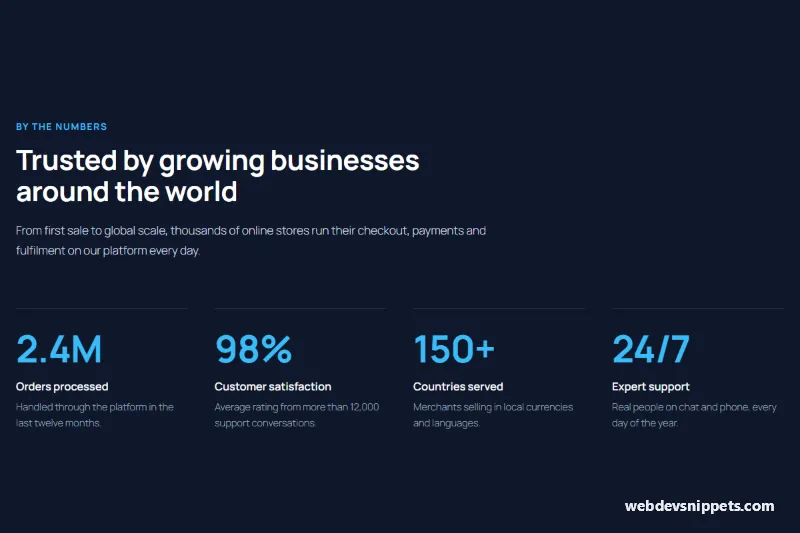
This stats section with four key numbers is a dark WordPress block pattern that presents company figures in a clean band. Use it as a key numbers section, a company statistics block or a numbers and figures band on a homepage or about page; it is built entirely with core Gutenberg blocks and needs no counter plugin.
How it works
A full-width Group with a #0f172a background and 112px vertical padding contains two parts. The header is an inner Group constrained to 720px and aligned left: a sky blue eyebrow, a white h2 and a light slate intro paragraph. Below it a Columns block holds four Column blocks. Each column has a 1px top border in #334155 and 32px top padding, so the numbers sit on thin divider lines. Inside, a large paragraph shows the number (2.4M, 98%, 150+, 24/7) in #38bdf8, followed by a bold white label and a short muted note. On phones the four stats stack vertically and the divider lines separate them.
How to use it
Copy the block markup.
Paste it into an empty paragraph in the block editor.
Replace the numbers, labels and notes with your own figures.
Customization
Band background: select the outer Group, Color > Background, #0f172a.
Number color and size: select a number paragraph, Color > Text #38bdf8, Typography > Size 60px, Appearance 700, Line height 1.
Divider lines: select a Column, Border > top side, width 1px, color #334155. Set the width to 0 to remove the lines.
Header width: select the inner Group, Layout > Content width 720px with left justification; switch to center to center the heading.
Labels and notes: labels use Color > Text #f8fafc at 17px weight 600, notes #94a3b8 at 15px.
Three stats: delete one Column and the others widen automatically.
Use cases
SaaS and e-commerce platforms: show orders processed, uptime or customer satisfaction.
Agencies and consultancies: highlight projects delivered, clients and years of experience.
Nonprofits: report people reached, funds raised and volunteers.
Investor and about pages: summarise growth figures at a glance.
Accessibility
The numbers are regular text, so screen readers read them in order with their labels. The section uses one h2; the stat labels are paragraphs to keep the outline short. Sky blue #38bdf8, white and #94a3b8 all meet WCAG AA contrast on #0f172a. No animation is used, so there is nothing to disable for reduced motion.
Can I use the Stats Section with Four Key Numbers code for free?
Yes. You can copy or download the block markup and use it in personal and commercial projects, including client work. No sign-up is needed. Reselling it as part of a component library or template collection is not allowed; see the license.
How do I add it to my WordPress site?
Copy the block markup, open a page in the block editor, click into an empty paragraph and paste. WordPress turns it into regular blocks that you can edit like any other content. You can also paste it in the Code editor view (Options menu > Code editor).
Does it need a page builder or plugin?
No. The pattern is built only from core blocks such as Group, Columns, Heading, Image and Buttons, so it works without Elementor, Spectra, Kadence or any other plugin. Colors and spacing are set on the blocks themselves; headings and text use your theme's fonts.
Will it look the same in my theme?
The layout, colors and spacing come with the blocks, so they carry over. Fonts, link styles and the content width follow your theme, so small differences are normal. The live demo shows the pattern in the default Twenty Twenty-Five theme. It works best with block themes; in classic themes the block editor still renders it, with your theme's styles.
Does it work on mobile?
Yes. The layout adapts to small screens. Use the Mobile and Tablet buttons above the live demo to check it at phone and tablet width.
How to install
Copy the block markup above.
Open a page or post in the WordPress block editor, click into an empty paragraph and paste. The editor turns the markup into blocks.
Replace the sample text and images. To reuse it, select the blocks and choose Create pattern from the block toolbar menu.
Uses only core WordPress blocks, so no plugin is needed. Tested with WordPress 6.8 and later. Fonts come from your theme; the live demo uses the default Twenty Twenty-Five theme. WebDevSnippets is not affiliated with or endorsed by the WordPress Foundation.
Stats Section with Four Key Numbers · WordPress Stats Sections