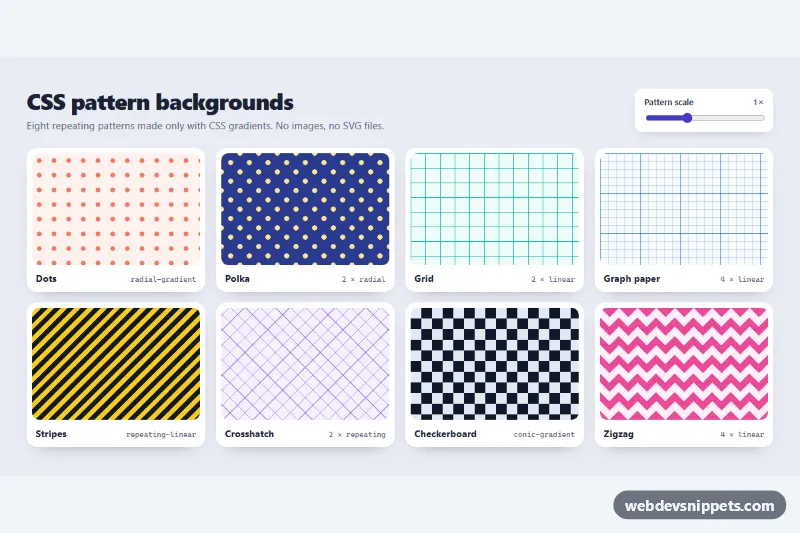
A gallery of eight repeating background patterns made only with CSS gradients: dots, polka, grid, graph paper, stripes, crosshatch, checkerboard and zigzag. It needs no image files and no SVG. A small slider rescales every pattern live. Use the patterns for hero sections, placeholders, cards, empty states or decorative page backgrounds.
How it works
The root section.pb-gallery holds a .pb-head with the title and a slider, and a ul.pb-grid of li.pb-tile items. Each tile has a .pb-swatch with one pattern class and a .pb-caption naming the technique.
Every pattern follows the same recipe. .pb-swatch paints --pb-bg as background-color, and each pattern class sets three custom properties: --pb-fg (the drawing color), --pb-bg and --pb-size (one repeat of the tile). The size used in the gradients is --pb-s, which is calc(var(--pb-size) * var(--pb-scale)).
.pb-dotsand.pb-polkauseradial-gradientcircles. Polka adds a second layer shifted by half a tile..pb-grid-linesand.pb-graphdraw 1px lines with horizontal and verticallinear-gradientlayers. Graph paper adds a lighter minor grid at one fifth of the size, colored by--pb-fg-minor..pb-stripesand.pb-crosshatchuserepeating-linear-gradientat -45 and 45 degrees..pb-checkeris a singleconic-gradient, and.pb-zigzagcombines four 25% triangles.
The script listens for input on .pb-scale and writes the value to --pb-scale on its own gallery, so all eight patterns resize together. It also updates the .pb-scale-value output. Without JavaScript the patterns render at their default size.
Customization
--pb-fgand--pb-bginside a pattern class such as.pb-stripes: change the two colors of that pattern. Yellow and black stripes become a soft brand stripe.--pb-sizein a pattern class: makes one repeat bigger or smaller, e.g.40pxfor chunkier checkerboard squares.--pb-scaleon.pb-gallery: the default multiplier for all patterns. Change themin,maxandstepof the.pb-scaleinput to widen the slider range.- The
calc(var(--pb-s) / 4)stops in.pb-stripes: change them for thinner or thicker stripes. heightin.pb-swatch: the preview height,8.5remon phones and10.5remfrom 960px.- To use a pattern on your own element, copy the pattern class, add
background-color: var(--pb-bg)and define--pb-s, or replace it with a fixed length.
Use cases
- Hero sections: a subtle texture behind the headline without image files
- Cards and placeholders: patterned areas for empty states or image placeholders
- Decorative page backgrounds: dots, grids or stripes that scale with one value
Accessibility
Each swatch is purely visual, so it has role="img" and an aria-label that names the pattern, such as "Checkerboard pattern". The slider is a native input type="range" inside a label, so it is keyboard operable with the arrow keys. It shows a visible :focus-visible outline, and the script sets aria-valuetext such as "1.5 times". Nothing animates, so no reduced-motion handling is needed. When you put text on top of a busy pattern, add a solid or semi-opaque panel behind the text to keep it readable.
Usage notes
Gradient patterns scale without blur on high-DPI screens and add no extra network requests. Several galleries can share a page, because each slider only updates its own .pb-gallery.