Skip to content

SaaS Footer with Status Badge and Language Menu

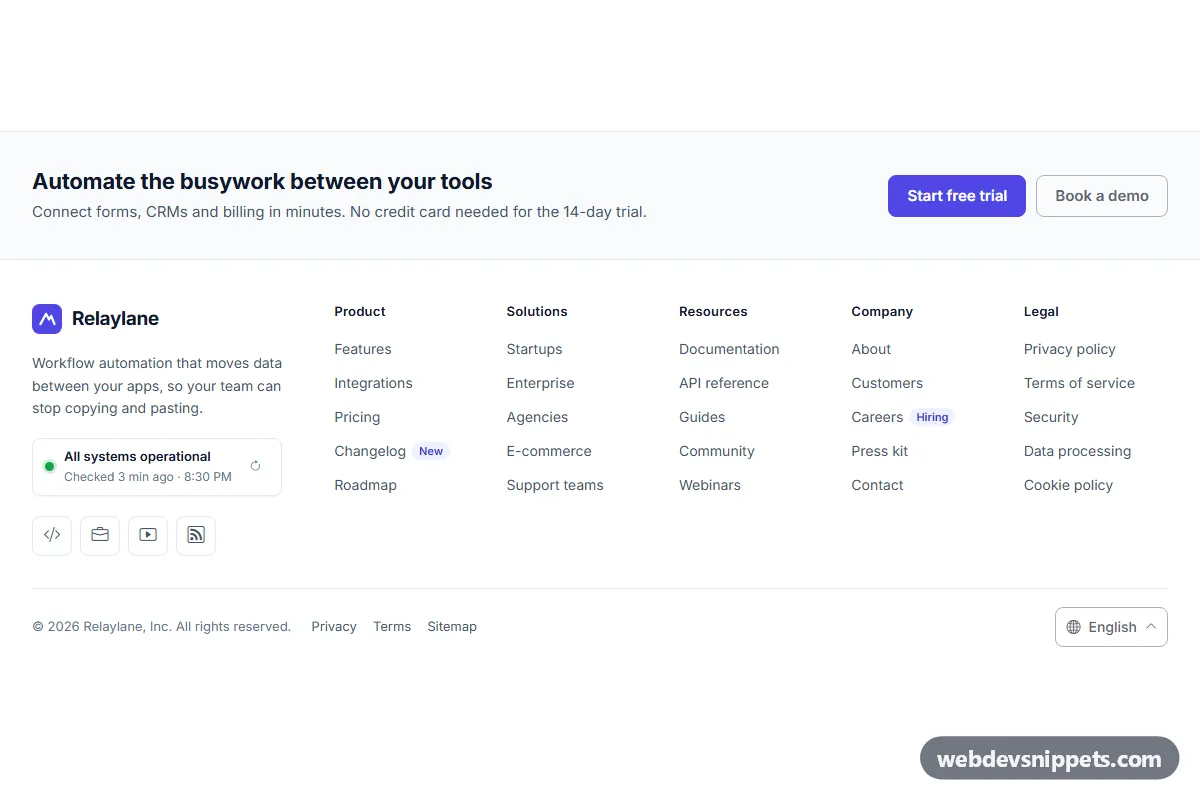
SaaS website footer with five link columns, a live system status badge with last-checked time, a Bootstrap 6 Menu language switcher and a compact legal row.

Also known as: saas website footer, footer with system status, footer language switcher, multi column footer links, software company footer

SaaS Footer with Status Badge and Language Menu live demo

Open in new tab

Bootstrap 6 code (HTML, CSS, JS)

A clean SaaS website footer built with Bootstrap 6: brand block, five link columns (Product, Solutions, Resources, Company, Legal), a live system status badge and a language switcher. Use this footer template on software, API and startup sites.

How it works

The root .sft-root holds a short .sft-page strip and the <footer class="sft-footer">. Inside, .sft-grid is a CSS grid: two columns on phones, five link columns from 768px, and from 1024px the .sft-brand block takes a wider first column. Every link column is a <nav> labelled by its <h3 class="sft-heading">.

The status badge .sft-status shows a green dot, the "All systems operational" link and a <time class="sft-checked-time">. script.js sets the last check to SFT_FIRST_CHECK_MINUTES before now and prints "3 min ago · 8:28 PM" in the visitor's clock format, refreshing the text every 30 seconds. The .sft-recheck button sets data-sft-status="checking" (amber dot, spinning icon), waits SFT_CHECK_DELAY ms and then stores a new check time.

The bottom row .sft-bottom has the copyright with the year computed in script, legal links and the language Menu. Clicking a [data-sft-lang] item moves .active and aria-current, updates .sft-lang-current and writes the code to data-sft-lang on the root.

Customization

  • --sft-accent, --sft-accent-strong and --sft-accent-soft on .sft-root: change the indigo logo, buttons, tags, focus rings and the active menu item.
  • --sft-ink, --sft-text, --sft-line and --sft-page-bg: adjust heading, link, divider and strip colours.
  • --sft-radius: rounds buttons, social icons, the status card and the menu (8px by default).
  • SFT_FIRST_CHECK_MINUTES and SFT_CHECK_DELAY in script.js: change the demo timing; replace the setTimeout in the recheck handler with fetch() to your status API.
  • data-sft-status="checking" on .sft-status: add your own values (for example a degraded state) with a matching dot colour in style.css.
  • Add or remove button.menu-item elements with data-sft-lang to change the languages; the click handler has a comment where to redirect to a localized URL.
  • Delete the .sft-page strip under your own content.

Use cases

  • SaaS and API products: link docs, changelog and pricing while showing uptime at a glance.
  • Developer tools: let users check service health before opening a support ticket.
  • Multilingual startup sites: switch the interface language from the footer.

Accessibility

Link columns are <nav> regions with headings, and the legal links have aria-label="Legal". The recheck button has an aria-label and aria-busy while checking; results and language changes are announced through a polite aria-live region. The Menu toggle updates aria-expanded and its aria-label names the current language; menu items carry lang attributes. Social links use generic icons with visually hidden network names. Focus outlines are visible, tap targets are at least 40px and the spinner respects prefers-reduced-motion.

Bootstrap 6 notes

The language switcher is a Bootstrap 6 Menu (data-bs-toggle="menu", .menu, .menu-item, h6.menu-header) opened upward with data-bs-placement="top-end", replacing the Bootstrap 5 dropdown. Buttons use btn-solid theme-primary and btn-outline theme-secondary; the indigo brand colour comes from scoped --bs-primary-* overrides. Built on 6.0.0-alpha.1, so alpha APIs can still change.
SaaS Footer with Status Badge and Language Menu at a glance

Framework
Bootstrap 6
Code
HTML, CSS, JavaScript
JavaScript
Vanilla JavaScript, no jQuery
Dependencies
Bootstrap 6, Bootstrap Icons, fonts.googleapis.com
Layout
Responsive, works on mobile
Category
Footers
License
Free for personal and commercial use

Questions about this template

Can I use the SaaS Footer with Status Badge and Language Menu code for free?

Yes. You can copy or download the code and use it in personal and commercial projects, including client work. No sign-up is needed. Reselling it as part of a component library or template collection is not allowed; see the license.

How do I add it to my website?

Load Bootstrap 6 and Bootstrap Icons and fonts.googleapis.com from a CDN (the links are under Requirements). Paste the HTML where the component should appear, add the CSS to your stylesheet and load the JavaScript before the closing </body> tag. Download HTML gives you a complete page with everything already linked.

Does it need jQuery or a JavaScript framework?

No. The script is plain vanilla JavaScript, so it works without jQuery, React or Vue. You can still use the markup inside those frameworks.

Does it work on mobile?

Yes. The layout adapts to small screens. Use the Mobile and Tablet buttons above the live demo to check it at phone and tablet width.

Requirements

Add these to your page (already included in the download):

  • <link rel="stylesheet" href="https://cdn.jsdelivr.net/npm/bootstrap@6.0.0-alpha.1/dist/css/bootstrap.min.css">
  • <script type="module" src="https://cdn.jsdelivr.net/npm/bootstrap@6.0.0-alpha.1/dist/js/bootstrap.bundle.min.js"></script>
  • <link rel="stylesheet" href="https://cdn.jsdelivr.net/npm/bootstrap-icons@1.11.3/font/bootstrap-icons.min.css">
  • <link rel="stylesheet" href="https://fonts.googleapis.com/css2?family=Inter:wght@400;500;600;700&display=swap">

Built for Bootstrap 6.0.0-alpha.1. Bootstrap 6 ships as an ES module, so its script and this component's JavaScript load with type="module". Alpha releases can still change before the stable version.

SaaS Footer with Status Badge and Language Menu – free Bootstrap 6 footer template
SaaS Footer with Status Badge and Language Menu · free Bootstrap 6 footer template

More Footers

Simple Centered Footer – free Pure CSS footer template

Simple Centered Footer

Minimal centered footer in pure CSS with a logo, tagline, links with animated underlines, round icon links and an auto-updating copyright year.

Dark Footer with App Badges – free Tailwind CSS footer template

Dark Footer with App Badges

Dark Tailwind CSS footer with four link columns, App Store and Google Play badges, and a language select that remembers the choice.

Footer with Newsletter – free Bootstrap 5 footer template

Footer with Newsletter

Dark Bootstrap 5 footer with a newsletter signup panel, email validation, social icons, three link columns and a legal bar.

Multi-Column Footer – free Tailwind CSS footer template

Multi-Column Footer

Dark Tailwind CSS website footer with brand block, social icons, four labelled link columns and a bottom bar with copyright and status.

Footer with Instagram Photo Grid – free Bootstrap 5 footer template

Footer with Instagram Photo Grid

Dark teal Bootstrap 5 footer with brand blurb, social icons, two link columns and a six-photo Instagram-style grid with hover like counts.

Mega Footer with Accordion on Mobile – free Bootstrap 6 footer template

Mega Footer with Accordion on Mobile

Large Bootstrap 6 footer whose five link columns turn into an exclusive details accordion on phones, with brand block, stats strip, CTA and legal bar.