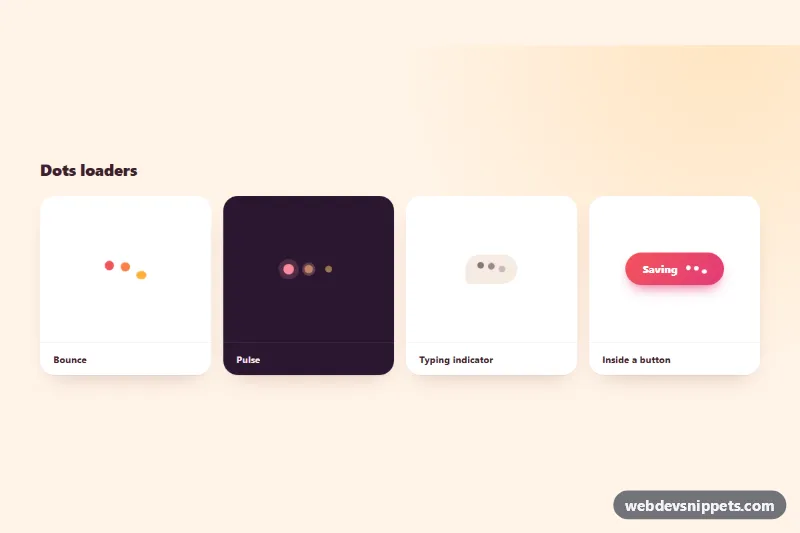
A set of three-dot loading animations in pure CSS: a squashy bounce, a pulse with expanding rings, a chat typing indicator and a compact version inside a "Saving" button. No JavaScript is needed, so the loaders work anywhere you need a small waiting state, from buttons to chat windows.
How it works
Every loader is a span.dl-dots with three span.dl-dot children. A variant class picks the keyframes: .dl-dots--bounce uses dl-bounce, which lifts each dot by --dl-height and squashes it slightly when it lands; .dl-dots--pulse uses dl-pulse for scale and opacity plus a ::after ring that grows with dl-ring; .dl-dots--typing uses the softer dl-typing inside a .dl-bubble. The wave effect comes from animation-delay on the first and second dots, calculated from --dl-speed. The delays are negative, so the dots are already out of step on the very first frame instead of starting together.
The second dot mixes the two colors with color-mix(), which gives a small gradient across the row. .dl-dots--small shrinks the dots and turns them white for use inside the .dl-button. The demo tiles (.dl-tile, .dl-stage, .dl-caption) only present the variants; copy the .dl-dots markup on its own.
Customization
--dl-colorand--dl-color-2on.dl-showcase(or on one.dl-dots): the first and last dot colors; the middle dot is a mix of both.--dl-sizeand--dl-gap: dot diameter and spacing.--dl-speed: length of one animation cycle; the delays scale with it.--dl-height: how high the bounce and typing dots jump..dl-tile--dark: shows how to override the colors for a dark background.- Add
.dl-dots--smallnext to a variant class to place the loader inside a button or a line of text.
Accessibility
Each standalone loader has role="status" and a visually hidden .dl-sr text such as "Loading…" or "Sam is typing…", so screen readers announce what is happening while the dots stay silent. In the button example the dots are aria-hidden, the button carries aria-busy="true" and aria-disabled="true", and its label reads "Saving your changes…". With prefers-reduced-motion: reduce the movement is replaced by a slow opacity fade (dl-fade) and the pulse rings are hidden.
Usage notes
Use one loader per waiting area and remove it, or set hidden, when the content arrives. Change the .dl-sr text to describe the actual task.