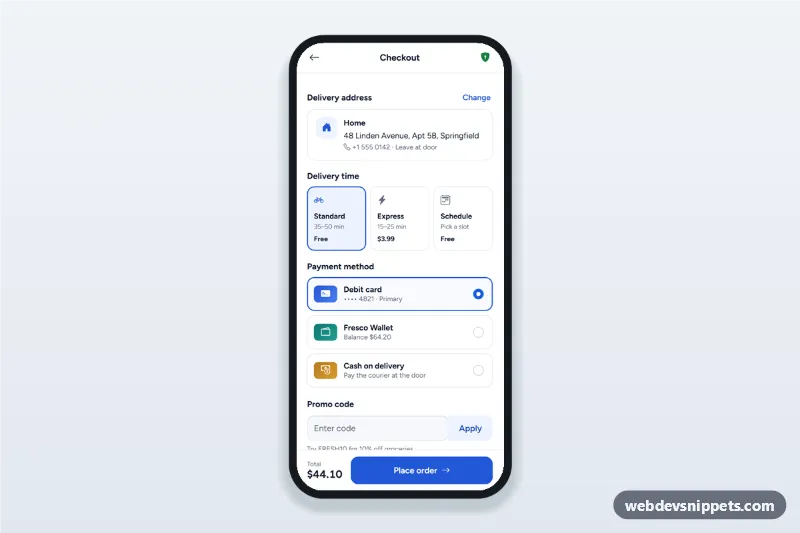
Mobile checkout screen with a delivery address sheet, delivery time options, payment method radio cards, promo code and a live order summary with place order.
Also known as: checkout page mobile ui, payment method selection screen, delivery app checkout, order summary page, cash on delivery checkout
A mobile checkout screen built with Bootstrap 6: an HTML mobile template with a delivery address card, three delivery time options, payment method radio cards for card, wallet and cash on delivery, a promo code field and an order summary that updates as you choose. Use this checkout page UI in grocery and food delivery apps, online shops and PWAs, or package it as a native app with Capacitor.
How it works
The root .mco-app is a 430 px app column. Everything sits in one <form class="mco-form" novalidate> with a sticky "Place order" bar (.mco-cta).
Address: the .mco-addr card shows the chosen address. "Change" opens a Bootstrap 6 Drawer (#mco-addr-sheet) with saved addresses as radios; "Deliver here" copies the data-label, data-line, data-note and data-icon values into the card.
Delivery time: .mco-time cards are radios (name="mco-speed") with a data-fee. "Schedule" reveals a <select> with one-hour windows that buildSlots() computes from the current time, so they never go stale.
Payment: .mco-pay rows use the Bootstrap 6 .radio input. Cash on delivery shows an exact-change note.
Promo code: an input-group with an Apply button (Enter works too). Codes from the PROMOS object add a discount row; unknown codes show an error.
Totals: recalc() adds subtotal, delivery fee and service fee, subtracts the discount and updates both .mco-total elements.
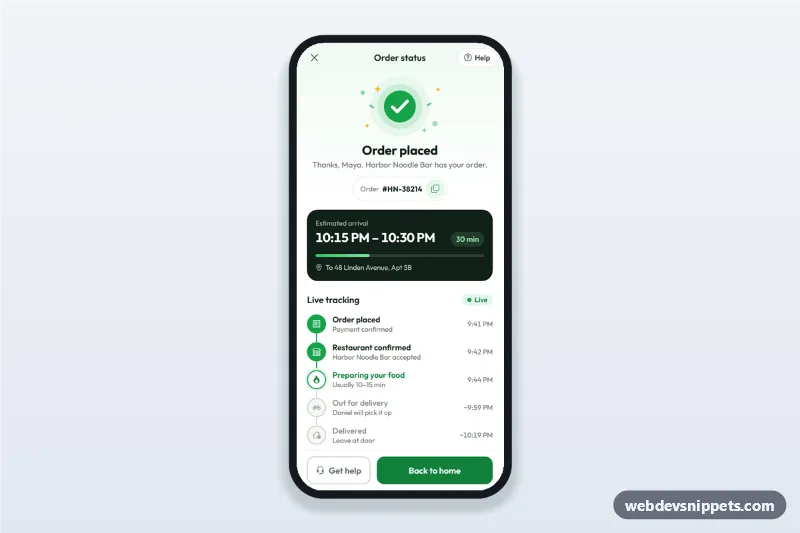
Place order: checks the scheduled window, shows a spinner, then opens the success sheet (.mco-success) with an order number.
Customization
--mco-blue on .mco-app: the primary color for selected cards, links and buttons (together with --bs-primary-bg).
SUBTOTAL, SERVICE and PROMOS in script.js: the cart numbers and the accepted promo codes.
data-fee on each name="mco-speed" radio: the delivery price added to the total.
OPEN and CLOSE in buildSlots(): the store's delivery hours; windows outside them roll over to the next day.
Replace the timeout in the submit handler with a fetch() that sends new FormData(form) to your order API.
Use cases
Grocery delivery apps: address, delivery window and payment on one screen.
Food delivery and restaurant ordering PWAs with express delivery and cash payment.
Online shops: a compact mobile checkout after the cart.
Accessibility
All choices are native radio buttons with visible labels, so arrow keys move inside each group. The promo message is aria-live="polite", invalid fields get aria-invalid, and a missing delivery window moves focus to the select. Both sheets are native modal <dialog> elements that close with Escape or the backdrop; focus moves into them on open. Touch targets are at least 44 px.
Bootstrap 6 notes
Built on Bootstrap 6.0.0-alpha.1 (alpha APIs can still change). The sheets use the new Drawer (drawer drawer-bottom) instead of Offcanvas, radios use .radio instead of form-check-input, the select uses form-control (there is no form-select), the promo button uses input-group-btn with btn-subtle theme-primary, and the main buttons use btn-solid theme-primary.
Can I use the Mobile Checkout with Payment Methods code for free?
Yes. You can copy or download the code and use it in personal and commercial projects, including client work. No sign-up is needed. Reselling it as part of a component library or template collection is not allowed; see the license.
How do I add it to my website?
Load Bootstrap 6 and Bootstrap Icons and fonts.googleapis.com from a CDN (the links are under Requirements).
Paste the HTML where the component should appear, add the CSS to your stylesheet and load the JavaScript before the closing </body> tag.
Download HTML gives you a complete page with everything already linked.
Does it need jQuery or a JavaScript framework?
No. The script is plain vanilla JavaScript, so it works without jQuery, React or Vue. You can still use the markup inside those frameworks.
Can I turn this screen into an iOS or Android app?
Yes. It is plain HTML, CSS and JavaScript, so it works in a mobile website or progressive web app as it is. To ship it as a store app, put it in the web folder of a Capacitor or Cordova project and build it for iOS and Android; replace the sample data with calls to your own API.
How does it look on a desktop screen?
The screen is designed for phones. On wider screens it stays at phone width in the middle of the page, so it still looks like an app. The live demo opens at mobile width; use the Tablet and Desktop buttons to check other sizes.
Requirements
Add these to your page (already included in the download):
Built for Bootstrap 6.0.0-alpha.1. Bootstrap 6 ships as an ES module, so its script and this component's
JavaScript load with type="module". Alpha releases can still change before the stable version.
Mobile Checkout with Payment Methods · Bootstrap 6 Mobile Shop & Checkout
Order confirmation screen for delivery apps with a success illustration, order number, ETA computed from now, live order tracking steps and a help sheet.