A trust badges section for Shopify that shows your store's promises, such as delivery, returns and support, with an optional line of payment icons. Place it on the home page, under a product or above the footer to answer common buying questions at a glance. Copy section.liquid into your theme's sections folder and add it from the theme editor as "WDS Trust badges".
How it works
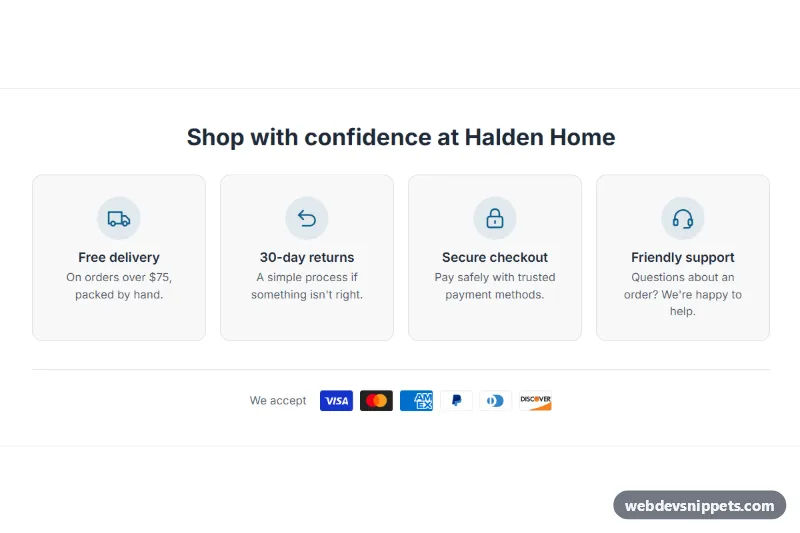
Each badge is a block with an icon, a short title and a line of text. The section has two layouts. Icon row is a slim strip separated by thin lines. With up to four badges on a wide screen, the icon sits beside the text. Cards puts each badge in a bordered card with a tinted circle behind the icon, which is what this preview shows.
Columns adapt to the width of the section and the number of badges. On phones, badges sit in two columns, and four badges become a tidy two-by-two grid on tablets. Up to 12 badges are allowed.
When Show payment icons is on, the section lists the payment methods enabled on your store, using the icons Shopify provides.
Customization
All of these are in the theme editor:
- Heading: optional. Leave it empty for a slim strip.
- Layout: Icon row or Cards.
- Alignment: Center or Left.
- Icon size: 20 to 48 px.
- Show lines above and below: the thin borders around the section.
- Show payment icons and Payment label: the label defaults to "We accept".
- Icon on each badge: Delivery, Returns, Secure checkout, Warranty, Support, Payment, Eco, Quality, Gift or Local.
- Custom image on each badge: replaces the icon with your own image, such as a certification mark you are entitled to use. Title and Text set the wording.
- Background, Text and Accent colors, plus Side padding, Top padding and Bottom padding.
Use cases
- Product pages: answer questions about delivery, returns and support right under the product
- Home pages: show your store's promises in an icon row or card layout
- Footers: place badges above the footer with an optional line of payment icons
- Stores with custom branding: choose from ten built-in icons or upload your own images
Accessibility
The badges are a real list. Titles become h3 headings when the section has a heading, and plain text when it does not, so the page outline stays correct. Built-in icons are hidden from screen readers because the title says the same thing. Custom images use their alt text from Shopify, and an image with no alt text is treated as decorative. Payment icons carry their own titles.
Usage notes
This section requires an Online Store 2.0 theme. It has no JavaScript and does not load theme snippets.
The preview uses sample data for an invented store, and the payment icons in it are examples. On your store they come from your own enabled payment methods, so the line disappears if none are available. The badges do not link anywhere. section.liquid contains no photos.
Every badge is a claim to your customers, so write only what your store actually offers. Replace the sample wording with your real delivery terms and returns period. With no badges, no heading and no payment icons, the section outputs nothing on the storefront.