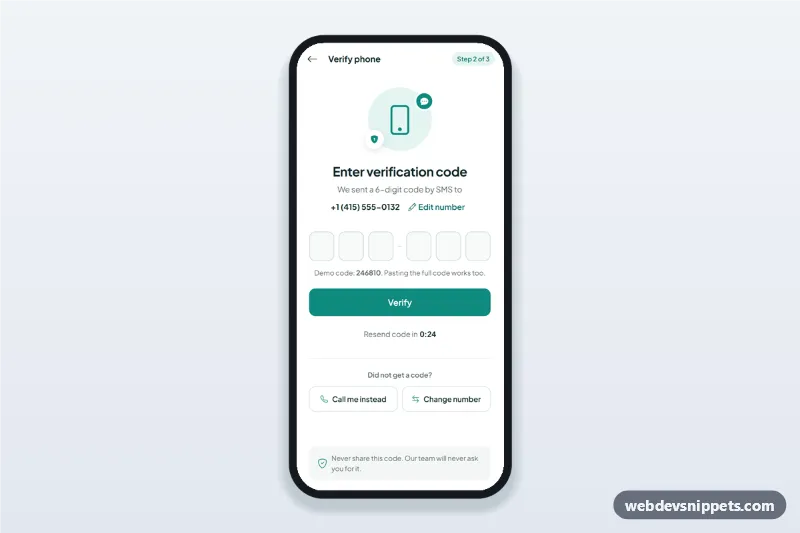
An HTML mobile template for an OTP verification screen: six one-digit code inputs with auto advance, paste support and one-time-code autofill, a resend timer and a sheet to edit the phone number. Use this SMS verification code input as the second step of a sign-up or two-factor login in mobile sites and PWAs, or package it with Capacitor. Built with Bootstrap 5 and Bootstrap Icons in a white and teal style.
How it works
The root .otv-app is a centred app column (max 430 px) with a code panel and a success panel ([data-otv-panel]). The .otv-form holds six .otv-digit inputs in a fieldset; the first has autocomplete="one-time-code" and all use inputmode="numeric", so phones show the number pad and offer the SMS code.
Typing a digit moves to the next cell, Backspace in an empty cell clears the previous one, and the arrow keys move between cells. Pasting or autofilling several digits spreads them over the cells. When all six are filled the code is checked automatically; A wrong code shakes the row and shows the remaining attempts; after three, the cells lock until a new code is sent.
The .otv-timer counts down from data-otv-seconds and then shows the Resend button. "Call me instead" switches the text to a voice call and restarts the timer. Edit number and Change number open the Bootstrap offcanvas .otv-sheet, a bottom sheet with a country code select and a type="tel" field (7 to 12 digits).
Customization
data-otv-codeon.otv-app: the demo code (246810). Remove the.otv-helphint and check the code on your server instead.data-otv-secondson.otv-app: the resend wait time in seconds.maxAttemptsinscript.js: how many wrong codes are allowed before the cells lock.--otv-teal,--otv-teal-darkand--otv-teal-softon.otv-app: the primary colour, its hover shade and the light tint.--otv-cellon.otv-app: the width of each code cell (40 px below 360 px screens).- The
window.setTimeoutinverify(): replace it with afetch()to your verification endpoint. - The options of
.otv-cc: add the country codes your service supports.
Use cases
- Sign-up flows in fintech, delivery and marketplace apps: confirm the phone number before creating the account
- Two-factor login in banking or health apps: enter the SMS code after the password
- Ride-hailing and taxi apps: verify the rider's number on first launch
Accessibility
Each cell has an aria-label such as "Digit 3 of 6" inside a fieldset with a hidden legend. Errors appear in a role="alert" paragraph and are linked to the first cell with aria-describedby, and the cells get aria-invalid. Resend, voice call and number changes are announced through a role="status" region. The sheet traps focus and closes with Escape or the backdrop. The shake animation is turned off with prefers-reduced-motion.
Usage notes
Requires Bootstrap 5 and Bootstrap Icons; Plus Jakarta Sans is loaded from Google Fonts. The back arrow has no action; connect it to your router.