Skip to content

Food Delivery App Phone Login

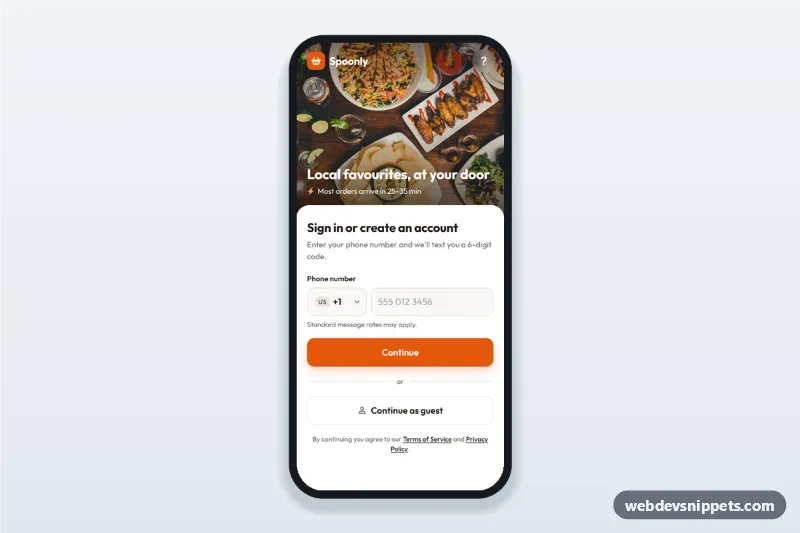
Food delivery app phone login screen with searchable country code picker, SMS code step and continue as guest: a mobile phone number sign-in UI with a food photo header.

Also known as: phone number login screen, food delivery app login ui, otp verification screen, country code phone input, mobile app sign in html

Food Delivery App Phone Login live demo

Open in new tab

Bootstrap 6 code (HTML, CSS, JS)

A food delivery app phone login screen built with Bootstrap 6: an HTML mobile template with a food photo header, a searchable country code picker, a phone number field, an SMS code step and a "Continue as guest" option. Use this phone number sign-in UI on mobile ordering sites and PWAs, or package it as a native app with Capacitor.

How it works

The root .fdl-app is a 430 px app column. The .fdl-hero header shows a cover photo with a dark gradient, the brand and a short delivery promise. Below it, the rounded .fdl-sheet overlaps the photo and holds three .fdl-step sections that are switched with the hidden attribute:

  • phone: the Bootstrap 6 Combobox (.combobox-toggle.fdl-cc with data-bs-search="true") lists country codes. Each .menu-item carries data-min and data-max digit counts, and data-bs-name="country" adds a hidden country input for form posts. The type="tel" field uses autocomplete="tel-national".
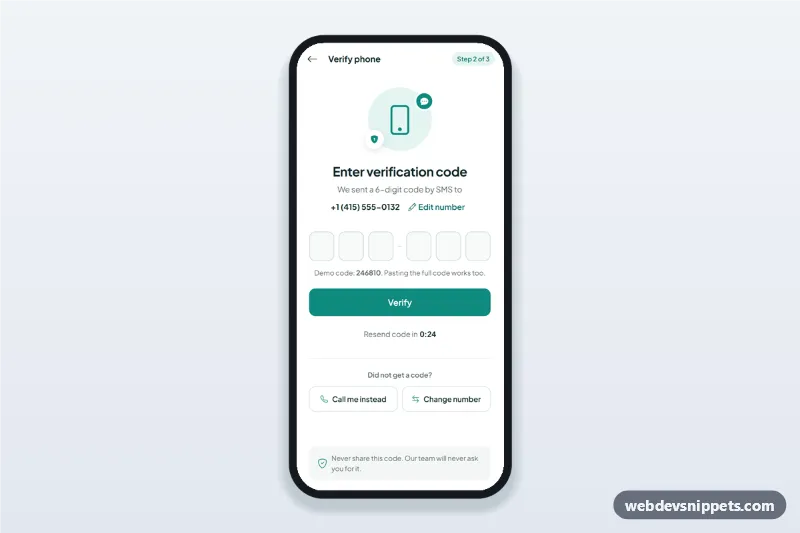
  • code: a Bootstrap 6 OtpInput (.otp[data-bs-otp]) with autocomplete="one-time-code", so phones can fill the SMS code. A 30-second timer turns into a "Resend code" button.
  • done: a confirmation with a "Start ordering" button.

script.js listens to change.bs.combobox to update the ISO badge (.fdl-cc-iso), validates the number length for the chosen country, shows a spinner while it "sends" the code, and submits the code form automatically on complete.bs.otpInput. "Continue as guest" shows a Bootstrap 6 Toast.

Customization

  • --fdl-orange on .fdl-app: changes the brand color of the logo, buttons and focus states; --bs-primary-bg keeps the btn-solid theme-primary buttons in sync.
  • Swap the photo in .fdl-hero-img and adjust height on .fdl-hero for a taller or shorter header.
  • Add countries by copying a .menu-item inside .fdl-cc-menu with its dial code, name, data-bs-value, data-min and data-max.
  • Change the countdown in startTimer() (30 seconds by default).
  • Replace the timeouts in the phoneForm and codeForm submit handlers with fetch() calls to your SMS and verification endpoints.
  • Edit .fdl-hero-title and .fdl-hero-meta for your own tagline and delivery time.

Use cases

  • Food delivery and takeaway apps: passwordless sign-in before checkout.
  • Grocery and meal kit apps: phone login with a guest option for browsing.
  • Restaurant ordering PWAs: quick SMS verification for repeat customers.
  • Ride and courier apps: the same phone plus code pattern with your own photo.

Accessibility

Every field has a visible label or aria-label. Errors are written into the linked aria-describedby message, the field gets aria-invalid, and focus returns to the field. The Combobox supports arrow keys, Enter and Escape; after a pick, focus moves to the number field. Step headings receive focus when the step changes, and the toast uses role="status". All buttons are at least 44 px tall.

Bootstrap 6 notes

Built on Bootstrap 6.0.0-alpha.1 (alpha APIs can still change). The country picker uses the new Combobox instead of a form-select, the code field uses OtpInput, buttons use btn-solid theme-primary and btn-outline theme-secondary, and the Toast is imported from the bundle as an ES module. Photo from Unsplash; replace it with your own image.
Food Delivery App Phone Login at a glance

Framework
Bootstrap 6
Code
HTML, CSS, JavaScript
JavaScript
Vanilla JavaScript, no jQuery
Dependencies
Bootstrap 6, Bootstrap Icons, fonts.googleapis.com
Layout
Mobile-first app screen, centred on wider screens
Category
Mobile Login & Sign Up
License
Free for personal and commercial use

Questions about this template

Can I use the Food Delivery App Phone Login code for free?

Yes. You can copy or download the code and use it in personal and commercial projects, including client work. No sign-up is needed. Reselling it as part of a component library or template collection is not allowed; see the license.

How do I add it to my website?

Load Bootstrap 6 and Bootstrap Icons and fonts.googleapis.com from a CDN (the links are under Requirements). Paste the HTML where the component should appear, add the CSS to your stylesheet and load the JavaScript before the closing </body> tag. Download HTML gives you a complete page with everything already linked.

Does it need jQuery or a JavaScript framework?

No. The script is plain vanilla JavaScript, so it works without jQuery, React or Vue. You can still use the markup inside those frameworks.

Can I turn this screen into an iOS or Android app?

Yes. It is plain HTML, CSS and JavaScript, so it works in a mobile website or progressive web app as it is. To ship it as a store app, put it in the web folder of a Capacitor or Cordova project and build it for iOS and Android; replace the sample data with calls to your own API.

How does it look on a desktop screen?

The screen is designed for phones. On wider screens it stays at phone width in the middle of the page, so it still looks like an app. The live demo opens at mobile width; use the Tablet and Desktop buttons to check other sizes.

Requirements

Add these to your page (already included in the download):

  • <link rel="stylesheet" href="https://cdn.jsdelivr.net/npm/bootstrap@6.0.0-alpha.1/dist/css/bootstrap.min.css">
  • <script type="module" src="https://cdn.jsdelivr.net/npm/bootstrap@6.0.0-alpha.1/dist/js/bootstrap.bundle.min.js"></script>
  • <link rel="stylesheet" href="https://cdn.jsdelivr.net/npm/bootstrap-icons@1.11.3/font/bootstrap-icons.min.css">
  • <link rel="stylesheet" href="https://fonts.googleapis.com/css2?family=Outfit:wght@400;500;600;700&display=swap">

Built for Bootstrap 6.0.0-alpha.1. Bootstrap 6 ships as an ES module, so its script and this component's JavaScript load with type="module". Alpha releases can still change before the stable version.

Food Delivery App Phone Login – Bootstrap 6 mobile login & sign up component screenshot
Food Delivery App Phone Login · Bootstrap 6 Mobile Login & Sign Up

More Mobile Login & Sign Up

OTP Verification Screen with Code Inputs – Bootstrap 5 mobile login & sign up preview

OTP Verification Screen with Code Inputs

OTP verification screen with six one-digit code inputs, auto advance, paste and one-time-code autofill, a resend timer and an edit phone number sheet.