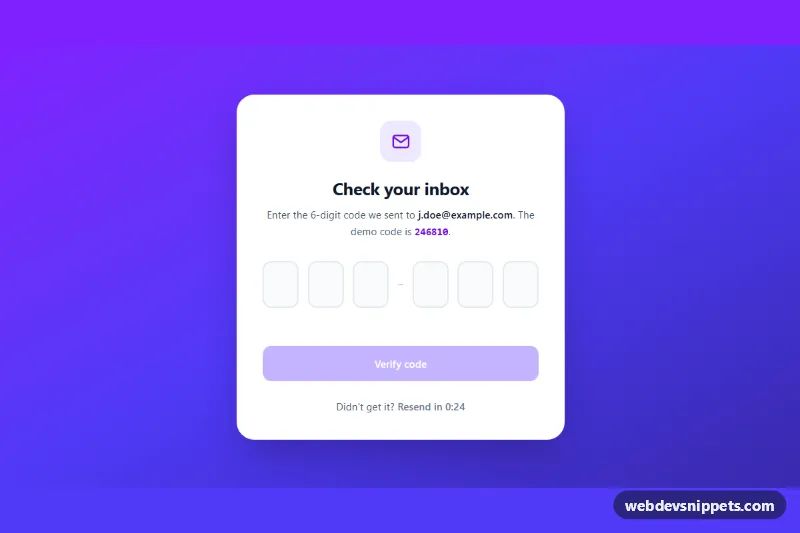
A one-time password (OTP) input built with Tailwind CSS and vanilla JavaScript: six separate digit boxes that auto-advance as you type, accept a pasted code, and verify it with a simulated request. Use it for email or SMS verification, two-factor sign-in and checkout confirmation screens.
How it works
The root is .tox-otp, a full-height gradient backdrop holding a white card. The form (data-tox-form) contains a fieldset with a visually hidden legend and six input.tox-digit fields inside data-tox-group. Each box is a text input with inputmode="numeric" and pattern="[0-9]*", so phones open the number pad. The first one has autocomplete="one-time-code", letting iOS and Android offer the code from an SMS. A hidden data-tox-value input always holds the combined six digits for a normal form post.
The script initializes every .tox-otp on DOMContentLoaded. On input, a single keystroke replaces the current digit and moves focus to the next box; longer values from autofill are spread across the boxes by fill(). On keydown, Backspace on an empty box clears the previous one and steps back, Arrow Left/Right, Home and End move between boxes, and letters are blocked. The paste handler strips non-digits, so "246 810" works, and a full code always starts in the first box. When all six boxes are filled the form submits itself. The submit handler shows a spinner, waits 900 ms, then compares the code with data-tox-expected and sets data-state="success" or data-state="error" on the root. The "Resend code" button starts a countdown from data-tox-resend seconds.
Customization
data-tox-expectedon.tox-otp: the demo code that verifies; in production remove it and replace thesetTimeoutin the submit handler with afetch()to your verification endpoint.data-tox-resendon.tox-otp: seconds before "Resend code" becomes clickable again, e.g.60.- Number of boxes: add or remove
input.tox-digitelements and update theiraria-label; the script reads the count from the markup. .tox-digit[data-filled]instyle.css: changeborder-colorto restyle boxes that already hold a digit..tox-otp[data-state="error"]and[data-state="success"]rules: set your own error and success colors;tox-shakecontrols the error wobble.from-violet-600 via-indigo-600 to-indigo-800on the root andbg-violet-600on the submit button: swap for another Tailwind palette to rebrand.- Remove the
spanseparator between the third and fourth box for an evenly spaced row.
Accessibility
Each box has an aria-label such as "Digit 3 of 6", and the fieldset links the instructions and the result through aria-describedby. The message paragraph is an aria-live="polite" region that announces checking, errors and success. Wrong codes set aria-invalid="true" on every box and return focus to the first one. Boxes show a 4px violet focus ring, buttons use focus-visible outlines, and the submit button stays disabled until the code is complete. The shake animation and spinner stop under prefers-reduced-motion: reduce.
Usage notes
Several instances can share a page because every query is scoped to its own .tox-otp root; give each copy unique id values for tox-desc and tox-message.